What Are Slowly Changing Dimensions? Types, Examples & Best Practices
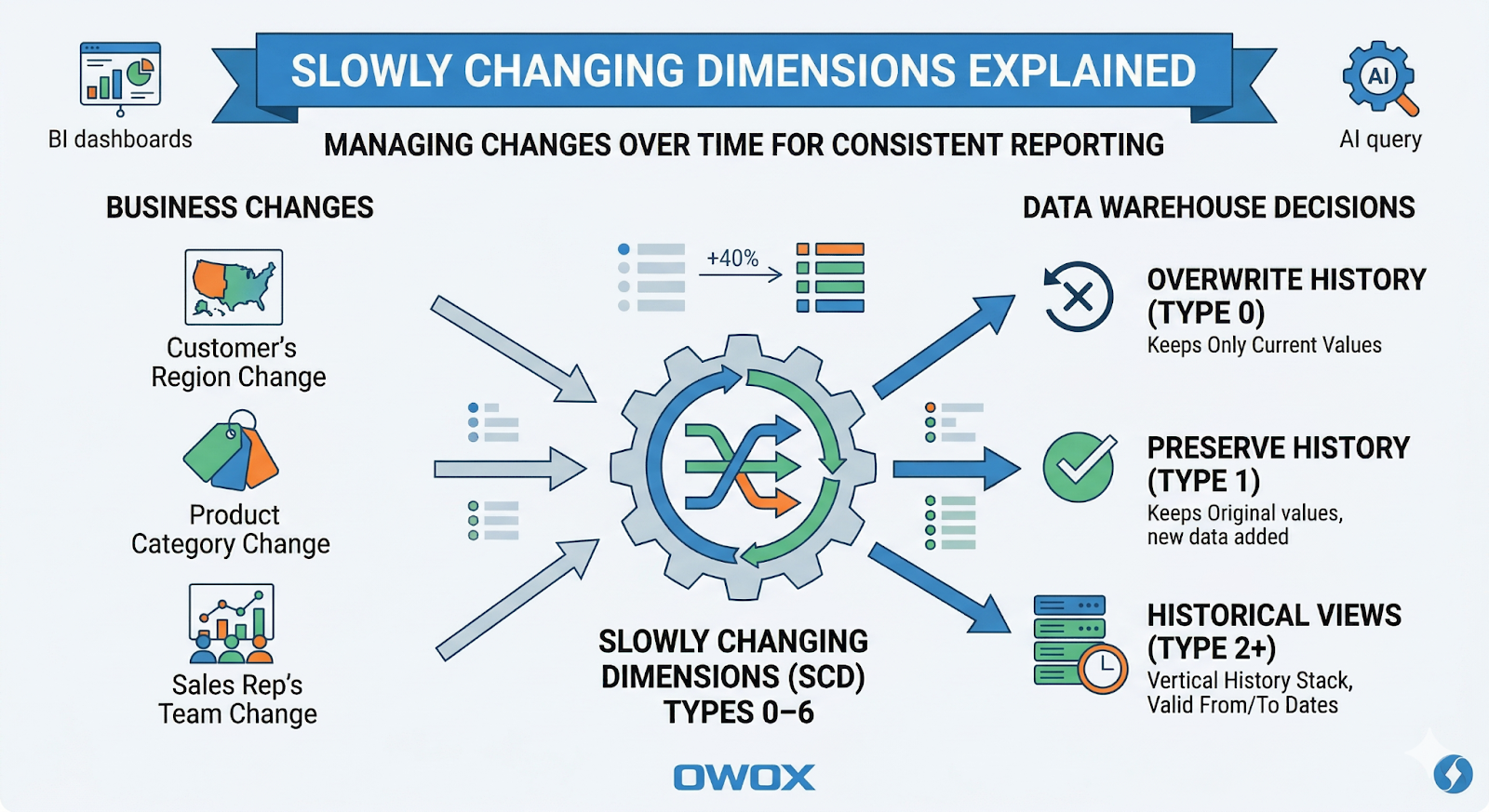
Slowly Changing Dimensions (SCD) are one of those concepts that quietly decide whether your analytics will be trusted – or endlessly questioned in meetings. Any time a "stable" business attribute changes – a customer's region, a product's category, a sales rep's team – you face a choice:
- Do you overwrite history?
- Do you preserve it?
- Or do you need both current and historical views side by side?
.png)
SCDs are the patterns that formalize those choices in your data warehouse. Getting them right means your dashboards, BI tools, and AI models see the same consistent history, no matter how many times your source systems change their mind.
In this article, you'll see what SCDs are, why they matter, and how SCD types 0–6 map to specific business needs in modern cloud warehouses like BigQuery, Snowflake, Redshift, Databricks, and Athena.
What Are Slowly Changing Dimensions?
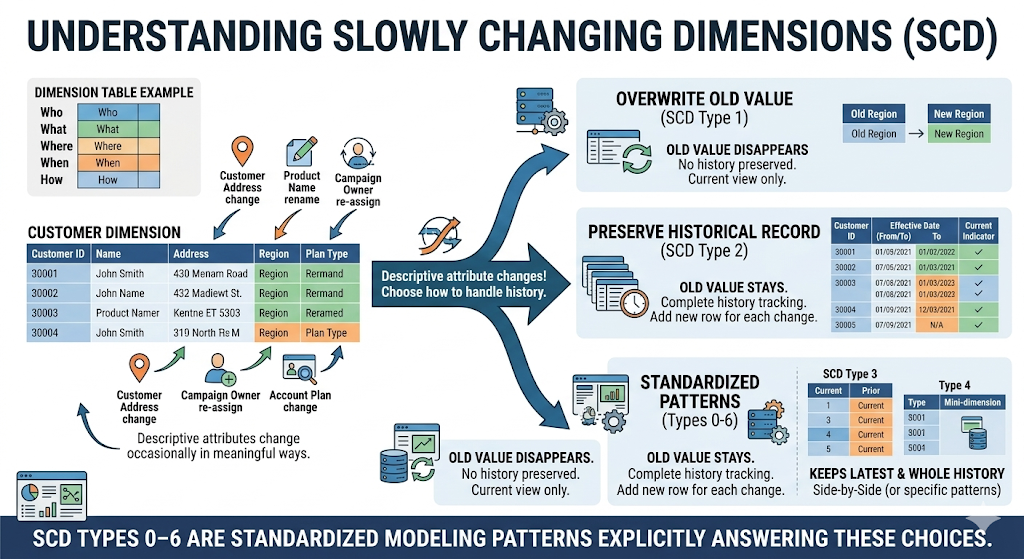
In dimensional modeling, a dimension is a table that describes the who, what, where, when, and how of your business: customers, products, campaigns, locations, employees, and more. A Slowly Changing Dimension is a dimension where those descriptive attributes:
- Don't change constantly (like event data), but
- Do change occasionally and in meaningful ways.
Typical examples:
- Customer address or region
- Product name, category, or brand
- Campaign owner or cost center
- Account plan type or tier
The word "slowly" doesn't mean "rarely" – it means "not on every row." And each time something changes, you must decide:
- Should the old value disappear?
- Should the old value stay as a historical record?
- Should we keep both the latest and the whole history?
SCD types 0–6 are standardized modeling patterns that answer those questions explicitly.
In classic Kimball-style dimensional modeling, a data warehouse is organized into:
- Fact tables holding numeric measurements (orders, sessions, ad costs, conversions)
- Dimension tables holding descriptive attributes (customers, products, campaigns, geos)
An SCD defines:
- How dimension rows are updated or versioned when attributes change
- How surrogate keys (e.g., customer_sk) relate fact rows to the correct version of a dimension row
- How validity intervals (e.g., valid_from, valid_to) or other markers define which version was active at a given point in time
Each SCD type (0–6) prescribes a specific structure and update behavior so analysts can reason about "current" vs "as-of" attributes consistently.
Why Slowly Changing Dimensions Matter for Analytics
Incorrect handling of changing attributes usually shows up as business confusion, not SQL errors. Typical symptoms are:
- Two dashboards show different revenue for "EMEA" because one includes old region assignments and the other doesn't.
- A churn model is trained on current customer segments, while historical reports use segments as they were "at the time" – leading to inconsistent insights.
- Finance wants revenue by current product category, while Product Analytics wants revenue by historical category. The same table can't satisfy both.
SCDs matter because they:
- Define what "historical" means in your warehouse.
- Align business expectations with how data is physically stored.
- Avoid ad-hoc logic scattered in Looker, Power BI, Tableau, or notebooks.
- Enable reproducible metrics even as dimensions evolve.
When you apply SCD patterns consistently, analysts can reliably answer questions like:
- "What was revenue by customer segment as known at the time?"
- "How does performance look if we reclassify customers into the current segmentation?"
- "What changed in this account just before churn?"
Facts vs Dimensions in a Modern Analytics Stack
A useful way to frame this is the classic facts vs dimensions distinction:
- Facts are measurements or events.
- Examples: orders, pageviews, ad impressions, subscription renewals, support tickets.
- They answer "how much," "how many," "when."
- Dimensions describe the context around those facts.
- Examples: customers, products, campaigns, geographies, sales reps, devices.
- They answer "who," "what," "where," and "through which channel."
Facts tend to be immutable once recorded ("the order was placed for $120"), but dimensions are not. A customer can move, products can be re-categorized, and account managers can change. SCDs are about how you store and query those changing dimension attributes so your facts remain analytically meaningful over time.
Common Business Scenarios That Require SCDs
You need SCDs anywhere the business cares about both what the attribute is now and what it used to be when past events occurred.
- Customer lifecycle stages
- Trial → Active → Churned → Reactivated
- Retention analysis needs to know the stage at the time of each event.
- Pricing tiers and plans
- "Starter" → "Growth" → "Scale" with evolving limits and features
- Revenue reporting might need both "old plan names" and a re-mapped "current taxonomy."
- Geographic or organizational changes
- Sales territories or regions are redrawn.
- Teams, segments, or departments merge and split over time.
- Product hierarchy evolution
- A product moves from "Legacy Add-Ons" to "Core Platform."
- Product analytics and finance may need historical and reclassified views.
In each case, simple overwrites make either historical views or current-state views incorrect. SCDs allow you to support both in a controlled way.
How Unmodeled Changes Break Historical Reporting
If you ignore SCDs and simply overwrite dimension values, you introduce subtle but serious issues:
- Historical dashboards "morph" over time as attributes are updated.
- Revenue by region or segment shifts even when no new data is loaded.
- Marketing can't reconcile last quarter's campaign performance with archived decks.
- Data scientists train models on a different view of history than finance uses for reporting.
For example, if all past orders are joined to a customer's current region (because you overwrote the region in the dimension table), last year's "North America" revenue may suddenly appear larger or smaller, depending on today's assignments.
Once stakeholders notice this kind of drift, trust in the data warehouse declines quickly. Typical business-side consequences:
- Endless reconciliation work in finance and RevOps.
- Stakeholders screenshotting charts as "evidence" because they expect them to change.
- Slowed decision-making – no one feels safe making a call based on unstable KPIs.
How SCD Types Affect Your Warehouse Design
Every SCD decision translates into table structure and ETL/ELT logic in your warehouse:
Table structure
- Do you need valid_from / valid_to and a "current" flag? (Type 2, 6)
- Do you add "previous_*" columns? (Type 3, 6)
- Do you separate current vs history into different tables? (Type 4, 5)
Load logic
- Are updates simple UPDATE statements? (Type 1)
- Do you need INSERT of new rows with window functions to end old versions? (Type 2, 6)
- Do you manage surrogate keys vs business keys across multiple tables? (Type 4, 5)
In modern cloud warehouses like BigQuery, Snowflake, Redshift, Databricks, and Athena, this typically means:
- ELT pipelines that compute SCD logic with SQL (dbt, Databricks SQL, native scripts)
- Partitioning and clustering to keep historical queries performant for large type 2 tables
- Semantic models/data marts that expose the right SCD view to BI tools
This is why SCD logic belongs in the warehouse layer, not in BI tools (where logic is duplicated and fragile) or application code (where it's invisible to analysts and difficult to audit). You define SCD logic once in your transformation layer, and everything downstream – dashboards, reports, experiments, and AI models – reads the same consistent history.
If you're not ready to design all of this from scratch, OWOX Data Marts can help you implement SCD logic directly on top of your warehouse, with ready-to-use data models for marketing and product analytics. You can explore it hands-on by starting free here: OWOX Data Marts.
Overview of SCD Types 0 Through 6
Instead of treating SCD types as academic labels, think of them as patterns along three axes:
- How much history do you keep
- How complex the implementation is
- How easy it is for analysts to use in self-service scenarios
Quick Summary Table of All SCD Types
This table is intentionally simplified. Real implementations will add details like surrogate keys, flags, and validity timestamps, which we'll cover in later sections.
Tradeoffs Across Accuracy, Complexity, and Storage
Each SCD type balances accuracy, complexity, and storage differently.
- Type 0 (Fixed)
- Accuracy: High for truly immutable attributes.
- Complexity: Minimal.
- Storage: Minimal.
- Risk: Misuse on attributes that do change leads to silent data quality issues.
- Type 1 (Overwrite)
- Accuracy: Good for "current state" views, bad for historical analysis.
- Complexity: Very low – simple updates.
- Storage: Minimal – one row per business key.
- Risk: Historical numbers can shift as attributes are overwritten.
- Type 2 (Full History)
- Accuracy: Best for time-aware analytics and cohorts.
- Complexity: Medium–high – needs versioning logic.
- Storage: Higher – one row per version.
- Risk: Poorly designed joins can pick the wrong versions or double-count.
- Type 3 (Limited History)
- Accuracy: Good for "before/after" comparisons, limited for long timelines.
- Complexity: Medium – additional columns per previous value.
- Storage: Moderate – still one row per key, but wider row.
- Risk: Doesn't scale when you need more than a few historical states.
- Type 4 (History Table)
- Accuracy: High if both current and history tables are maintained properly.
- Complexity: Medium–high – two tables and synchronization logic.
- Storage: Similar to Type 2 but split across tables.
- Risk: Analysts may accidentally use only the current table when they need history.
- Type 5 (Mini-dimension + Type 1)
- Accuracy: High; separates volatile attributes into their own dimension.
- Complexity: High – more joins and surrogate keys.
- Storage: Efficient for very high-cardinality, frequently changing attributes.
- Risk: Misunderstood joins; requires strong documentation and training.
- Type 6 (1+2+3 Hybrid)
- Accuracy: Very high – full row history plus convenience attributes.
- Complexity: Highest – combination of versioning and roll-up columns.
- Storage: Highest – multiple versions plus extra columns.
- Risk: Overkill for simple use cases; needs careful governance.
In modern cloud warehouses, storage is usually cheap. Complexity and maintainability tend to matter more than raw disk usage.
Choosing the Right SCD Type Per Dimension and Use Case
You don't have to pick a single SCD type for your entire warehouse. Instead, decide per attribute or per dimension:
- Use Type 0 for truly immutable attributes (e.g., birth_date, original_sku).
- Use Type 1 for data corrections (fix spelling, normalize names) and attributes only needed "as of now" (e.g., internal notes, flags).
- Use Type 2 when you care about historical states (segment, region, lifecycle stage), run retention/cohort/attribution analysis, or need reproducible numbers over time.
- Use Type 3 for targeted "before vs after" comparisons, e.g., a re-segmentation or rebrand.
- Use Type 4/5 when operational systems need a very slim "current" dimension, or you separate frequently changing attributes into mini-dimensions for performance.
- Use Type 6 for high-maturity analytics teams that need both full history and fast current-state reporting, with the governance to support complex models.
A practical rule of thumb:
- Start with Type 1 for simple, low-impact attributes.
- Introduce Type 2 where stakeholders ask historical questions.
- Add Type 3–6 patterns selectively when specific performance or modeling requirements appear.
SCD Types 0, 1, and 2 with Real-World Examples
Most real-world warehouses rely heavily on three patterns: Type 0, Type 1, and Type 2. Understanding these clearly is essential if you want to make the right call in situations like SCD Type 1 vs Type 2, design a robust customer dimension SCD, or implement a correct SCD Type 2 surrogate key strategy.
This section walks through each type with concrete business examples and practical SQL/dbt-style patterns you can adapt in BigQuery, Snowflake, Redshift, Databricks, or Athena.
SCD Type 0: Retain Original Values for Fixed Reference Data
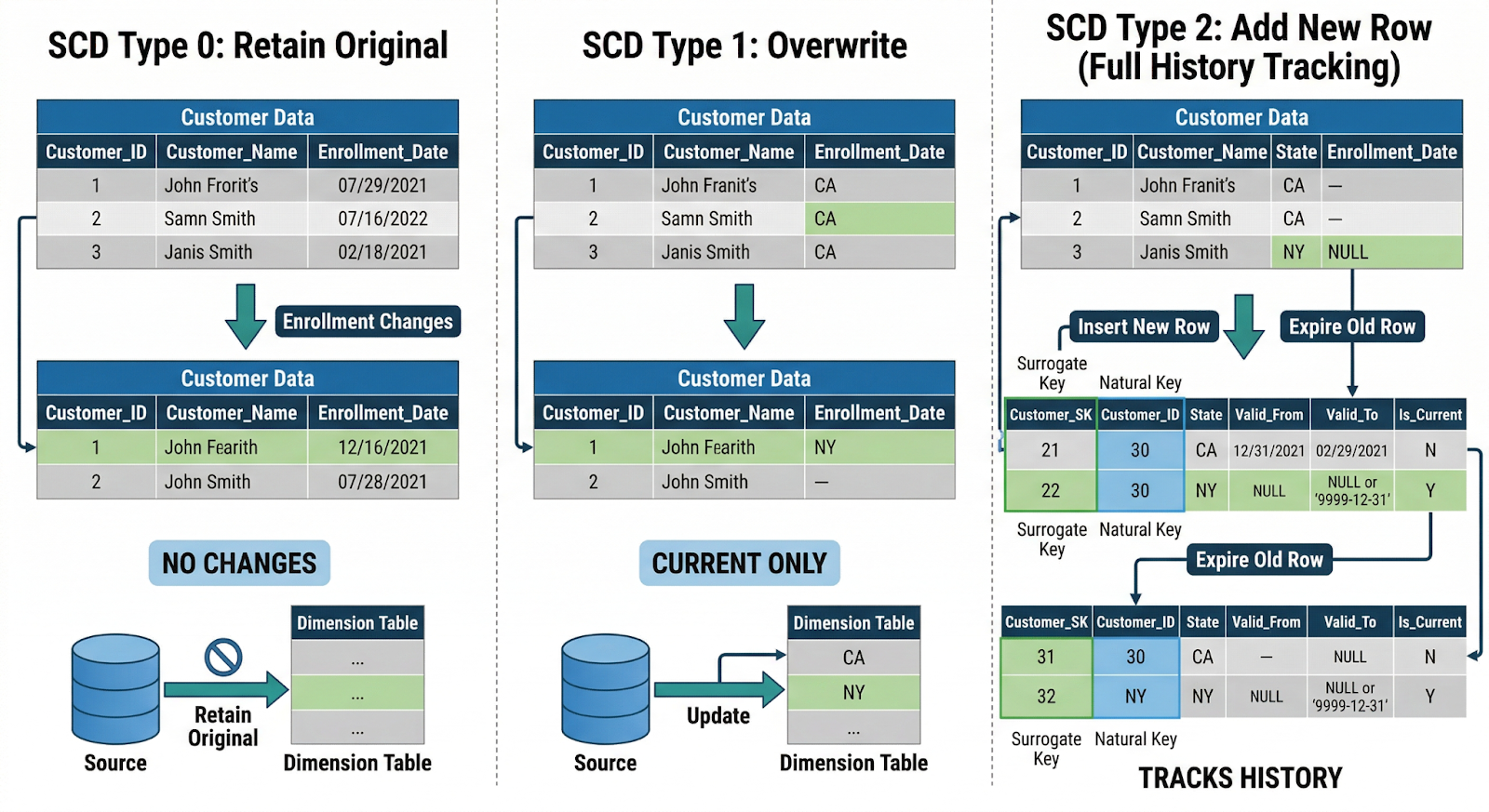
Definition: Type 0 assumes that once a dimension row is created, specific attributes never change. If the source system changes them, you ignore those changes in the warehouse.
Typical attributes:
- Product SKU code
- Original signup source (e.g., "Organic Search")
- Customer birth date
- Contract start date (for the original agreement)
These attributes are baked into historical facts – if you later reclassify them, you risk corrupting past analysis.
Example: Product reference data
1CREATE TABLE dim_product (
2product_sk       BIGINT GENERATED BY DEFAULT AS IDENTITY,
3product_id       STRING,         -- business key
4sku_code         STRING,         -- fixed, Type 0
5created_date     DATE,
6-- other descriptive attributes...
7PRIMARY KEY (product_sk)
8  );
Your load logic might:
- Insert new product_id rows
- Reject/log any attempt to modify sku_code
This keeps a stable reference backbone for joins and ensures analyses like "profit by original SKU" remain reproducible.
When to use Type 0:
- The attribute is legally or logically immutable.
- Changing it would make old reports impossible to reconcile.
- You want absolute stability, even if the source "fixes" it later.
SCD Type 1: Overwrite Values for Non-Historical Attributes
Definition: Type 1 simply overwrites attributes when they change. You keep a single row per business key; no historical versions.
This is ideal for attributes where:
- Only the current value matters, or
- Past values were wrong and should be treated as if they never existed.
Common scenarios:
- Correcting misspellings in customer_name
- Updating billing_email or phone_number
- Normalizing country from "U.S.A" → "United States"
Example: Correcting customer contact info
1CREATE TABLE dim_customer (
2customer_sk      BIGINT GENERATED BY DEFAULT AS IDENTITY,
3customer_id      STRING,      -- business key
4customer_name    STRING,
5email            STRING,
6phone            STRING,
7signup_date      DATE,
8PRIMARY KEY (customer_sk)
9);
Upserts (simplified) in dbt-style pseudo-SQL:
1MERGE INTO dim_customer AS t
2USING stg_customer_updates AS s
3ON t.customer_id = s.customer_id
4WHEN MATCHED THEN
5UPDATE SET
6customer_name = s.customer_name,
7email         = s.email,
8phone = s.phone
9WHEN NOT MATCHED THEN
10INSERT (customer_id, customer_name, email, phone, signup_date)
11VALUES (s.customer_id, s.customer_name, s.email, s.phone, s.signup_date);
No additional columns, no history logic. Facts always join to the latest attribute values.
When to use Type 1:
- Historical values don't matter or would be misleading.
- You're fixing data quality issues (typos, standardization).
- The business only asks "What is this value now?" rather than "What was it then?".
SCD Type 2: Track Full History with Surrogate Keys and Dates
Definition: Type 2 stores a new row for each change of relevant attributes and uses:
- A surrogate key (*_sk) for joins from facts
- Effective date range columns (e.g., valid_from, valid_to)
- Sometimes, an is_current flag
This is the go-to pattern when you need reliable historical analysis.
Key principles:
- Facts link to the correct historical version via the surrogate key.
- A business key (e.g., customer_id) can appear in multiple rows over time.
- Only one row per business key is current at any given time.
Example: Customer lifecycle and region changes
1CREATE TABLE dim_customer_scd2 (
2customer_sk      BIGINT GENERATED BY DEFAULT AS IDENTITY,
3customer_id      STRING,        -- business key
4customer_name    STRING,
5lifecycle_stage  STRING,        -- e.g., 'Trial', 'Active', 'Churned'
6region           STRING,        -- e.g., 'EMEA', 'NA'
7valid_from       DATE,
8valid_to         DATE,
9is_current       BOOLEAN,
10PRIMARY KEY (customer_sk)
11);
A single customer_id might have rows like:
Basic SCD Type 2 upsert (simplified logic)
1-- 1. End-date existing current rows where something changed
2UPDATE dim_customer_scd2 AS t
3SET
4valid_to = s.change_date - INTERVAL '1 DAY',
5is_current = FALSE
6FROM stg_customer_changes AS s
7WHERE t.customer_id = s.customer_id
8AND t.is_current = TRUE
9AND (
10t.lifecycle_stage != s.lifecycle_stage
11OR t.region != s.region
12);
13
14-- 2. Insert new "current" version rows
15INSERT INTO dim_customer_scd2 (
16customer_id, customer_name, lifecycle_stage, region,
17valid_from, valid_to,is_current
18)
19SELECT
20s.customer_id,
21s.customer_name,
22s.lifecycle_stage,
23s.region,
24s.change_date AS valid_from,
25DATE '9999-12-31' AS valid_to,
26TRUE AS is_current
27FROM stg_customer_changes AS s;
Querying with SCD Type 2
You join facts (e.g., orders) to the dimension using the surrogate key already resolved in a previous step or by time-based logic:
1SELECT
2o.order_id,
3o.order_date,
4c.lifecycle_stage,
5c.region
6FROM fact_order AS o
7JOIN dim_customer_scd2 AS c
8ON o.customer_sk = c.customer_sk;
Or, if you only have customer_id and order_date:
1JOIN dim_customer_scd2 AS c
2ON o.customer_id = c.customer_id
3AND o.order_date BETWEEN c.valid_from AND c.valid_to
When to use Type 2:
- You need a reproducible history for metrics (e.g., revenue by region as known at the time).
- You do cohort and lifecycle analysis (e.g., retention by stage).
- You run models that rely on time-aware features (like past pricing tier or past segment).
This pattern is crucial for a robust customer dimension SCD in any subscription or B2B context.
Use Cases: Customer Status, Pricing Tiers, and Region Changes
Customer Status (Lifecycle Stages)
- Type 0: Rarely appropriate; status does change.
- Type 1: Use if you only care about the current status (e.g., for a CRM list).
- Type 2: Use if you analyze churn, upgrades, reactivations, and want to know the status at the time of each event.
Example question: "Was this customer in 'Trial' or 'Active' when they made their first purchase?" → Requires Type 2; Type 1 can't answer this reliably.
Pricing Tiers and Plan Names
- Type 1: Good for correcting typos in plan names. Fine when finance restatements aren't required.
- Type 2: Needed if you want to see how a plan performed before and after its structure changed. Essential for historical plan-based revenue analysis.
Example (Type 2 price plan dimension):
1CREATE TABLE dim_pricing_plan_scd2 (
2plan_sk        BIGINT GENERATED BY DEFAULT AS IDENTITY,
3plan_id        STRING,
4plan_name      STRING,
5monthly_price  NUMERIC,
6valid_from     DATE,
7valid_to       DATE,
8is_current     BOOLEAN
9);
Regional Hierarchy Changes
Regions and territories are often redrawn:
- Type 1: Use if you always want to see revenue aligned with the current regional structure, even for past sales.
- Type 2: Use if you must preserve how regions were defined historically for audits, bonuses, or performance reviews.
Example question: "What was Q1 revenue under the region layout at that time?" → Type 2. "How would Q1 have looked under today's regions?" → Type 1 (or Type 6 hybrid, discussed later).
In practice, a single dimension often mixes approaches: some attributes are Type 0 (immutable), some Type 1 (corrections only), and others Type 2 (full history). The right balance depends on which questions stakeholders ask, regulatory/audit requirements, and tolerance for complexity vs. need for accuracy.
Advanced SCD Types 3, 4, 5, and 6
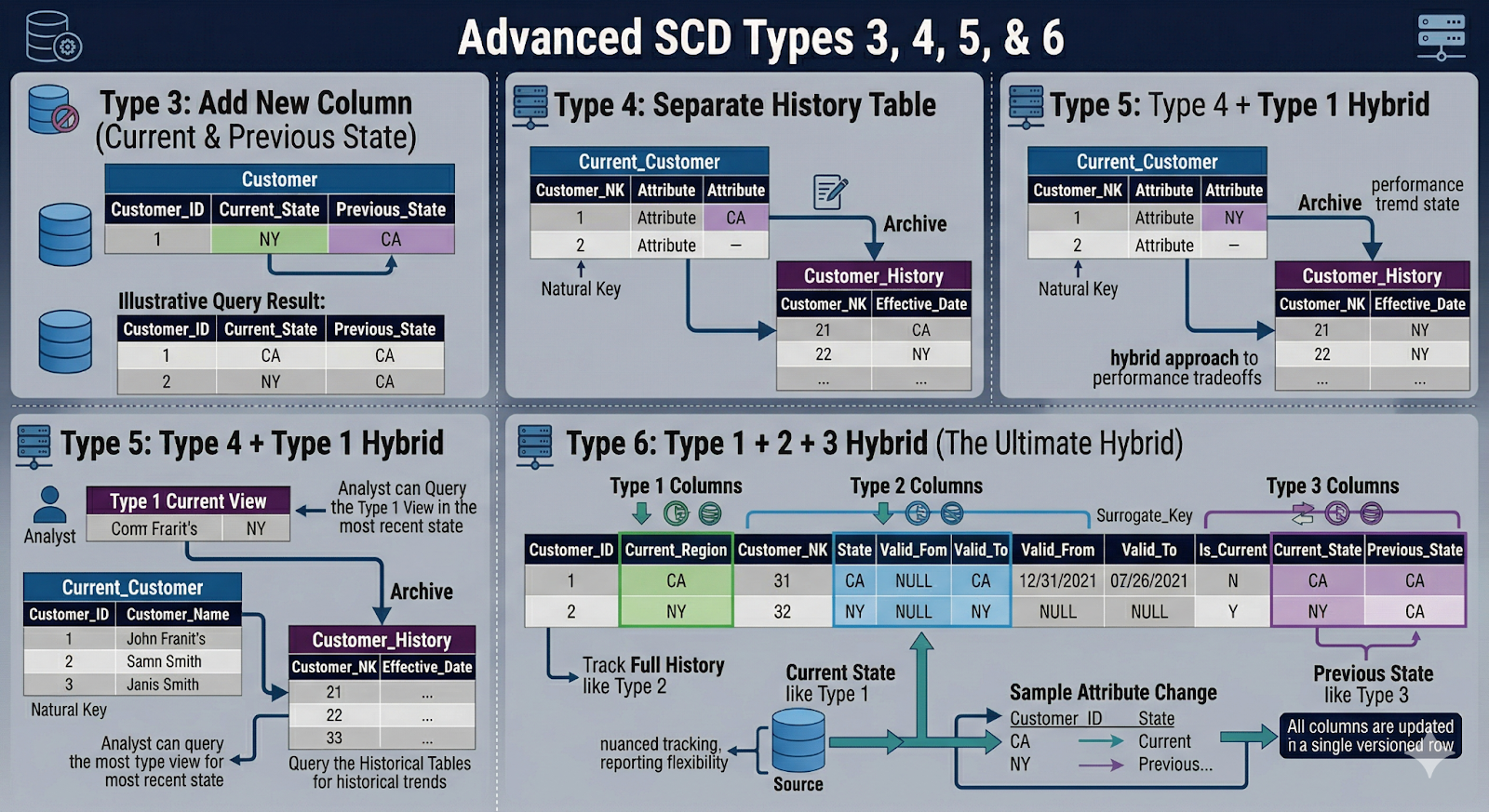
Once you've mastered Types 0, 1, and 2, you'll occasionally run into more complex situations where those basic patterns don't quite fit. That's where SCD types 3, 4, 5, 6 come in – the "advanced slowly changing dimensions" patterns used for nuanced, high-scale, or hybrid requirements.
SCD Type 3: Limited History with Previous Value Columns
Core idea: Keep current value + a fixed number of previous values as separate columns on the same row. You don't add new rows; you rotate values between columns.
Example: tracking a customer's current and previous segments:
1CREATE TABLE dim_customer_type3 (
2customer_id           STRING PRIMARY KEY,
3current_segment       STRING,
4previous_segment      STRING,
5segment_assigned_at   DATE
6);
When current_segment changes, you:
- Move current_segment → previous_segment
- Set the new current_segment
- Optionally track when the change occurred
Use cases:
- "Before and after" comparisons, e.g., segment migration A → B
- Measuring the impact of a reclassification or rebrand
- Simple models that only need the last state, not the full history
Pros:
- Easy to query – no need for date-based joins
- Only one row per business key
- Good for focused analytical questions
Cons:
- Limited history: once you exceed your "previous" slots, you lose older states
- Becomes unwieldy if you need more than one or two old values
- Not suitable for detailed time-series or cohort analysis
SCD Types 4 and 5: Splitting Current vs Historical Attributes
Both Types 4 and 5 split concerns between the current state and history, but they do it differently.
SCD Type 4: Current Dimension + Separate History Table
Core idea: Keep a slim current dimension table and move historical versions into a separate history table.
Example:
1CREATE TABLE dim_customer_current (
2customer_id        STRING PRIMARY KEY,
3current_segment    STRING,
4region             STRING
5-- no history columns
6);
7
8CREATE TABLE dim_customer_history (
9customer_hist_sk   BIGINT GENERATED BY DEFAULT AS IDENTITY,
10customer_id        STRING,
11segment            STRING,
12region             STRING,
13valid_from         DATE,
14valid_to           DATE
15);
Operational systems and most BI reports join to dim_customer_current. More advanced analytics, audits, or time-travel analyses query dim_customer_history.
Pros:
- Keeps "hot path" joins very fast (small current table).
- Separates operational and analytical concerns.
- History can be archived or partitioned without touching current data.
Cons:
- Two places to look; analysts must know when to use each.
- ETL/ELT is slightly more complex (sync + archive logic).
SCD Type 5: Mini-Dimension + Type 1 Override
Core idea: Move highly volatile, often-used attributes into a separate mini-dimension, while retaining a Type 1 "current snapshot" in the main dimension for convenience.
Example:
1-- Mini-dimension for fast-changing attributes
2CREATE TABLE dim_customer_profile_mini (
3profile_sk       BIGINT GENERATED BY DEFAULT AS IDENTITY,
4segment          STRING,
5risk_band        STRING,
6valid_from       DATE,
7valid_to         DATE
8);
9
10-- Main dimension referencing the mini-dimension
11CREATE TABLE dim_customer_type5 (
12customer_id      STRING PRIMARY KEY,
13profile_sk       BIGINT,  -- historical link
14current_segment  STRING,   -- Type 1 override
15current_risk     STRING
16);
Facts can join via profile_sk to get historical segmentation or use current_segment for quick, high-level reporting.
Pros:
- Efficient storage for high-cardinality, rapidly changing attributes.
- Simplifies many queries by exposing current values directly.
- Good for very large-scale customer or product sets.
Cons:
- More joins and surrogate keys to manage.
- Documentation and governance are crucial; it's easy to misjoin.
SCD Type 6: Combining Types 1, 2, and 3 for Complex Needs
Type 6 is the "Swiss Army knife" of SCDs – a hybrid of Type 1 (overwrite), Type 2 (row-versioned history), and Type 3 (previous value columns).
Core idea: Keep full row-level history and convenience columns for current and, sometimes, previous values.
Example:
1CREATE TABLE dim_customer_type6 (
2customer_sk          BIGINT GENERATED BY DEFAULT AS IDENTITY,
3customer_id          STRING,        -- business key
4segment              STRING,        -- historical (Type 2)
5region               STRING,        -- historical (Type 2)
6current_segment      STRING,        -- Type 1-style current snapshot
7previous_segment     STRING,        -- Type 3-style previous
8valid_from           DATE,
9valid_to             DATE,
10is_current           BOOLEAN
11);
When a customer's segment changes, you:
- Close out the old row (valid_to, is_current = FALSE).
- Insert a new row with the updated segment, updating both current_segment and previous_segment appropriately.
Use cases:
- Teams need both accurate historical joins (for cohorts, attribution, audits) and simple "current state" metrics without complex joins.
- Complex customer lifecycle or pricing analyses where "what was" and "what is" are equally important and frequently queried.
Pros:
- Extremely flexible for analytics; supports most business questions.
- Reduces complexity in downstream SQL for common use cases.
Cons:
- Highest implementation and maintenance complexity.
- Wider tables and more logic in your transformations.
- Requires strict governance to avoid confusion.
When Advanced SCDs Make Sense Versus Keeping It Simple
Not every team needs advanced slowly changing dimensions from day one. Overengineering SCDs can slow down adoption and confuse analysts.
Use advanced types when:
- You've clearly identified concrete questions that simple Type 1/2 models can't answer efficiently.
- Dimension attributes change frequently and at scale (millions of entities, daily changes).
- Operational workloads require very fast "current-only" access, while analytics still need history (Types 4/5).
- You have a mature data team that can document, test, and own the added complexity (Type 6).
Keep it simple when:
- You're early in your warehouse journey.
- Stakeholders mostly ask about the current state or simple trends.
- You don't yet have strong governance for complex models.
A practical approach:
- Start with Type 1 and Type 2 for most dimensions.
- Introduce Type 3 for focused before/after comparisons.
- Add Type 4/5/6 only where there's a proven need and clear ROI.
Designing and Implementing SCD Type 2 in the Warehouse
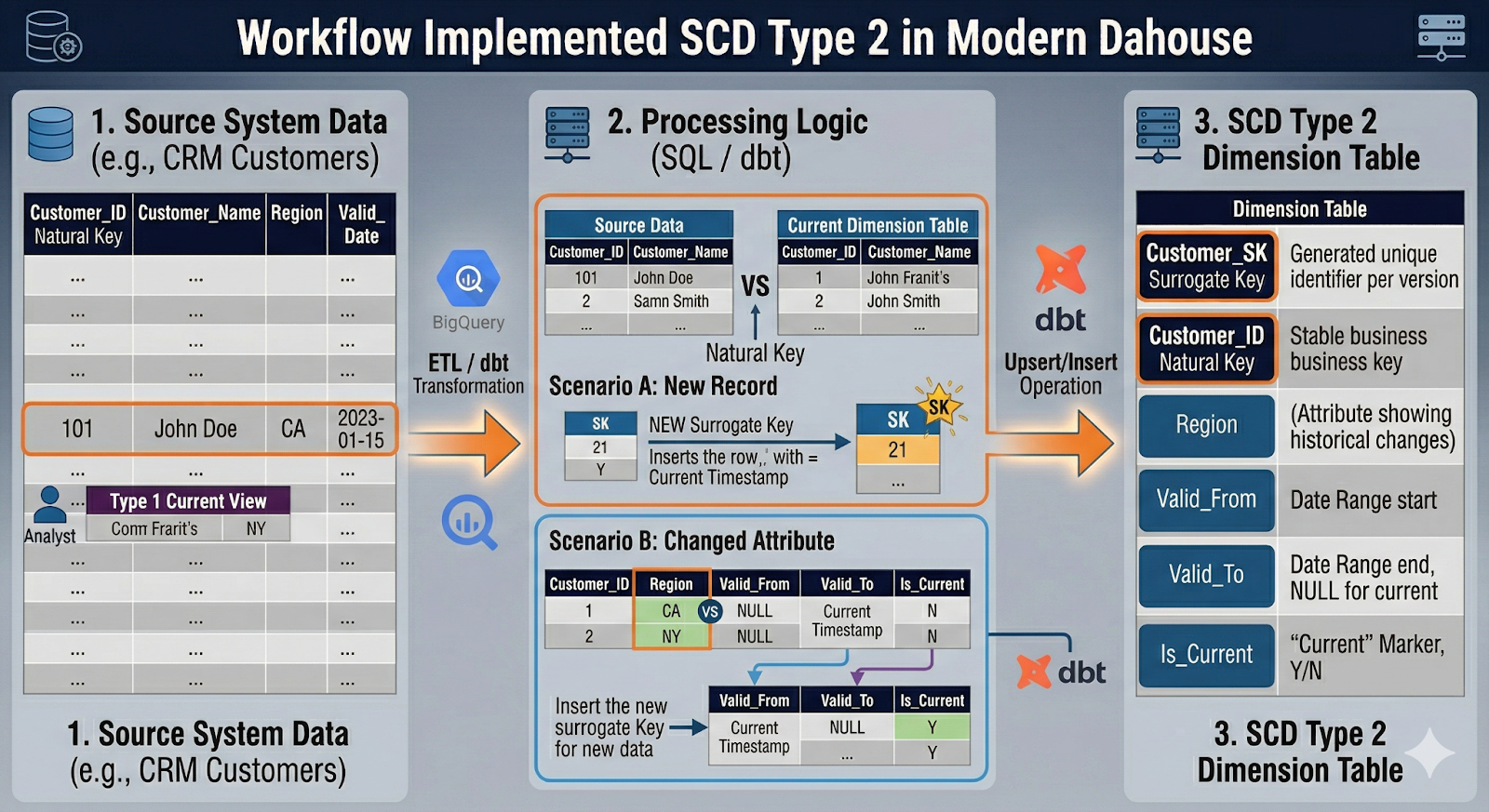
For most teams, SCD Type 2 is where slowly changing dimensions move from theory to real engineering. Whether you're building dbt slowly changing dimensions, designing an SCD Type 2 surrogate key strategy, or implementing BigQuery slowly changing dimensions, the same fundamentals apply:
- A stable natural key (business ID)
- A surrogate key per version
- Effective date range and a "current" marker
- Reliable insert/update logic in SQL or dbt
Surrogate Keys vs Natural Keys and Grain of the Dimension
An SCD Type 2 dimension must be crystal clear about grain and keys.
- Natural key (business key): Comes from source systems (e.g., customer_id, account_id, product_code). Identifies the real-world entity. Can appear in multiple rows over time in a Type 2 dimension.
- Surrogate key: Technical identifier generated in the warehouse (e.g., customer_sk). Identifies the version of the entity, not the entity itself. Used as the foreign key in fact tables.
Grain definition: Before modeling, answer: "What does one row in this dimension represent?"
For a typical customer dimension SCD Type 2:
- Grain: One row = one version of a customer, valid for a continuous time interval
- Keys: customer_id identifies the customer; customer_sk identifies the version
Schema sketch:
1CREATE TABLE dim_customer_scd2 (
2customer_sk       BIGINT GENERATED BY DEFAULT AS IDENTITY,
3customer_id       STRING,        -- natural key
4customer_name     STRING,
5lifecycle_stage   STRING,
6region            STRING,
7-- SCD metadata
8valid_from        TIMESTAMP,
9valid_to          TIMESTAMP,
10is_current        BOOLEAN,
11PRIMARY KEY (customer_sk)
12);
Key rule: Facts should point to customer_sk where possible, so each event is tied to the exact historical version that was valid at that time. If you can't do that (e.g., due to system constraints), you'll need time-based joins via customer_id + date, which are more complex and slower.
Effective Date, End Date, and Current Flag Design
SCD Type 2 works because every row knows when it was valid.
Typical pattern:
- valid_from (or effective_date)
- valid_to (or expiry_date)
- is_current (Boolean)
Design considerations:
- Use a closed-open interval pattern where valid_from = inclusive, valid_to = exclusive (e.g., next version's valid_from).
- Represent "still active" rows using either a sentinel max date (e.g., 9999-12-31) or a NULL valid_to with is_current = TRUE.
Example (closed-open with sentinel):
1valid_from           valid_to             is_current
2-------------------  -------------------  ----------
32024-01-01 00:00:00  2024-03-10 00:00:00  FALSE
42024-03-10 00:00:00  9999-12-31 00:00:00  TRUE
Why the is_current flag?
- Fast filters for "latest version only" use cases.
- Simpler logic than checking valid_to = '9999-12-31'.
- Helpful in dbt tests: you can assert that each customer_id has exactly one current row.
Basic dbt tests (YAML-style example):
1tests:
2  - dbt_utils.unique_combination_of_columns:
3      combination_of_columns: ['customer_id', 'valid_from']
4  - dbt_utils.expression_is_true:
5      expression: "is_current = TRUE"
6      where: "valid_to = '9999-12-31'"
Storage and Performance Considerations in Modern Cloud Warehouses
Storage is rarely the limiting factor anymore, but scan cost and join performance still matter. Behavior varies slightly by platform:
BigQuery
- Columnar storage + per-scan pricing.
- Type 2 tables can grow large, but partitioning by valid_from or ingestion date and clustering by customer_id is usually enough.
- Time-based joins can be expensive; prefer resolving customer_sk in staging models.
Snowflake
- Compressed columnar storage with automatic micro-partitioning.
- Handles large Type 2 tables well; clustering on customer_id or valid_from can help for heavy joins.
- Query caching and automatic clustering reduce manual tuning needs, but avoid unnecessary SELECT * on full history tables.
Redshift
- Columnar with sort and distribution keys.
- Choose sort keys like (customer_id, valid_from) to speed up SCD queries.
- Be mindful of distribution style for large fact–dimension joins (e.g., DISTKEY(customer_sk) on facts).
Databricks
- Optimized for large-scale batch/streaming.
- Use Z-Ordering on customer_id and date columns for better skipping.
- Delta's ACID guarantees make MERGE-based SCD patterns straightforward.
Athena (on S3)
- Pay-per-scan on data lake files.
- Strongly prefer partition pruning and avoiding full table scans of historical dimensions.
- Use narrow column projections and filtered views (e.g., WHERE is_current = TRUE) for most BI use.
Across all platforms:
- Keep Type 2 tables narrow (avoid unnecessary high-cardinality columns).
- Provide "current-only" and "as-of" views or data marts for downstream tools.
- Use appropriate partitioning or clustering on time and natural key.
Patterns for Implementing SCD Type 2 in SQL or dbt
A practical dbt slowly changing dimensions implementation follows a repeatable pattern:
- Identify existing current rows.
- Detect changes between existing and staged data.
- End-date old rows where changes occurred.
- Insert new version rows.
Below is a simplified pattern you can adapt to BigQuery, Snowflake, Redshift, or Databricks.
1. Identify changes in a staging model
1WITH latest_dim AS (
2  SELECT *
3  FROM dim_customer_scd2
4  WHERE is_current = TRUE
5),
6
7staged AS (
8  SELECT
9    customer_id,
10    customer_name,
11    lifecycle_stage,
12    region,
13    updated_at  -- from source
14  FROM stg_customer
15),
16
17diff AS (
18  SELECT
19    s.*,
20    d.customer_sk,
21    d.lifecycle_stage AS old_lifecycle_stage,
22    d.region         AS old_region
23  FROM staged s
24  LEFT JOIN latest_dim d
25    ON s.customer_id = d.customer_id
26)
27
28SELECT *
29FROM diff
30WHERE
31  old_lifecycle_stage IS NULL
32  OR old_lifecycle_stage != lifecycle_stage
33  OR old_region        != region;
This diff identifies new customers (no customer_sk) and existing customers whose tracked attributes changed.
2. MERGE pattern (dbt-style pseudocode)
1MERGE INTO dim_customer_scd2 AS t
2USING diff AS s
3ON t.customer_id = s.customer_id
4AND t.is_current = TRUE
5
6WHEN MATCHED THEN
7  -- End-date existing current row
8  UPDATE SET
9    valid_to   = s.updated_at,
10    is_current = FALSE
11
12WHEN NOT MATCHED THEN
13  -- Insert new version row
14  INSERT (
15    customer_id,
16    customer_name,
17    lifecycle_stage,
18    region,
19    valid_from,
20    valid_to,
21    is_current
22  )
23  VALUES (
24    s.customer_id,
25    s.customer_name,
26    s.lifecycle_stage,
27    s.region,
28    s.updated_at,
29    TIMESTAMP '9999-12-31 00:00:00',
30    TRUE
31  );
Adapter notes:
- BigQuery: use MERGE directly, or incremental dbt models with merge_update_columns.
- Snowflake / Databricks / Redshift: similar MERGE semantics.
- Athena: If MERGE isn't available, emulate using INSERT + CTAS patterns against Delta/Iceberg.
3. dbt macro approach
You can wrap this pattern into a reusable macro, e.g., scd_type_2, that accepts table name, natural key columns, SCD-tracked columns, and valid_from/valid_to columns. This keeps your SCD logic consistent across dimensions.
Pitfalls and Best Practices
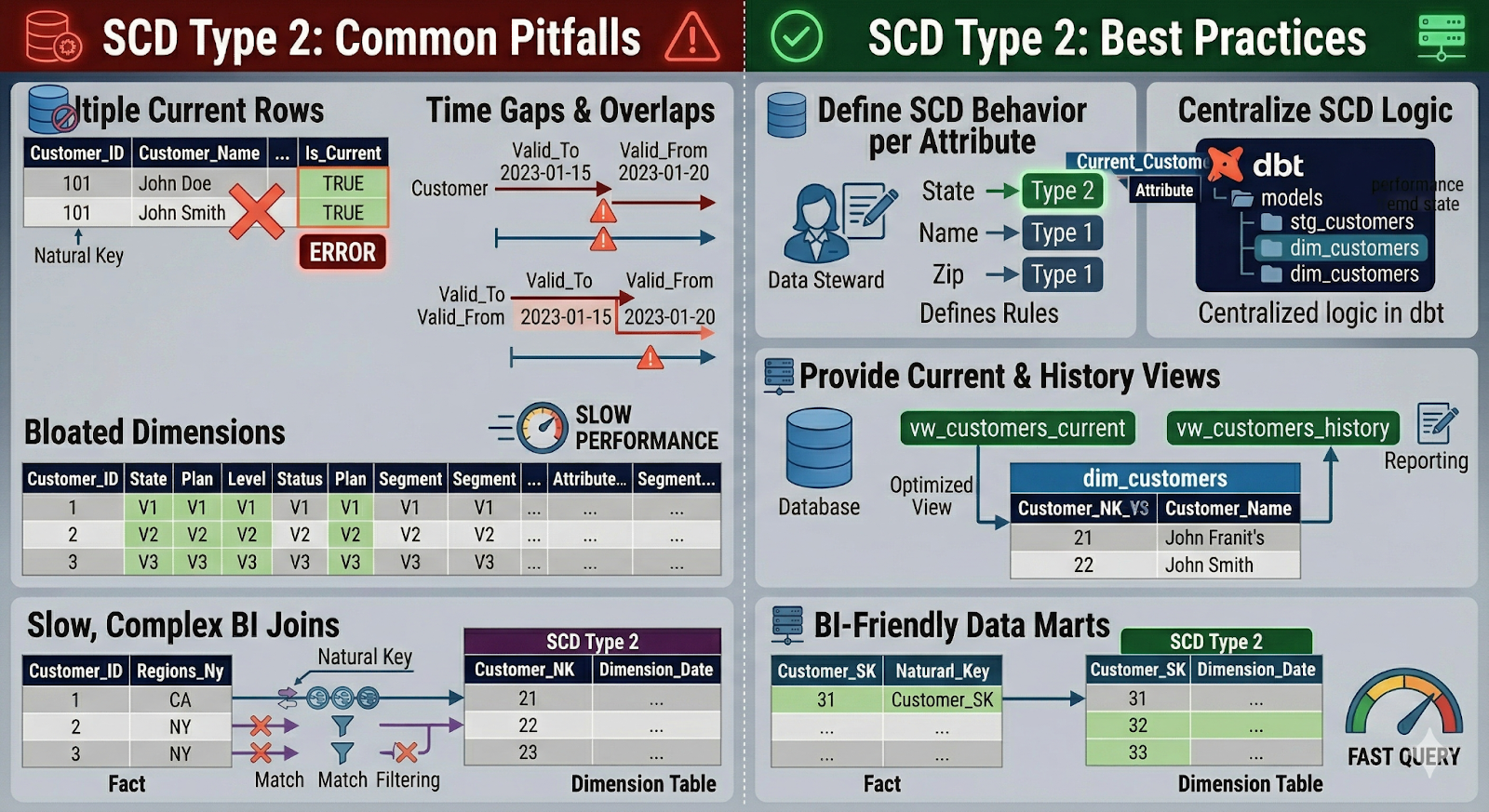
Common pitfalls:
- Multiple current rows per natural key – Caused by bugs in the merge logic. Mitigate with dbt tests enforcing exactly one is_current = TRUE row per customer_id.
- Time gaps or overlaps in validity ranges – Occur when valid_to and valid_from aren't aligned. Standardize on closed-open intervals and adjust in a single macro.
- Bloated dimensions – Caused by tracking too many attributes as Type 2. Be selective: only version attributes that matter for analytics.
- Slow, complex joins from BI tools – When fact tables don't carry the surrogate key. Prefer resolving *_sk in a transformation step and exposing BI-friendly data marts.
Best practices:
- Define SCD behavior per attribute, not just per table.
- Centralize SCD logic in dbt models or SQL scripts, not in BI tools.
- Provide current-only and history-aware data marts/views for different use cases.
- Document SCD rules in your data catalog and model docs.
Making SCD-Aware Dimensions Reusable with Governed Data Marts
By this point, you've seen how different SCD types work and how easy it is to create reporting inconsistencies when SCD logic is scattered across tools. The missing piece is how to make all that careful modeling reusable and dependable at scale.
That's where data mart slowly changing dimensions come in. Instead of letting every report and notebook reinvent history, you expose a small set of governed data marts that encode SCD rules once and serve them everywhere.
Exposing SCD Logic via Stable Data Marts for Self-Service Analytics
A data mart is a curated, business-friendly layer on top of your raw and modeled tables. For SCDs, this means:
- Dimensions that encode SCD rules precisely (Type 1 vs Type 2 vs hybrids).
- Fact tables that already resolve surrogate keys and "as-of" relationships.
- Views or tables that expose current-only and history-aware perspectives explicitly.
For example:
- customer_dim_current – one row per customer, is_current = TRUE.
- customer_dim_history – full SCD Type 2 history.
- sales_mart_as_of – sales facts joined to the correct historical version of customer, region, and pricing.
Self-service users don't need to understand how dbt slowly changing dimensions are implemented. They just need clear table names, stable schemas, and confidence that "revenue by region" means the same thing everywhere.
Feeding Consistent SCD-Aware Dimensions into BI, Sheets, and AI Insights
Once your SCD-aware dimensions are centralized in data marts, you can plug them into:
- BI tools – Every dashboard filters and aggregates on the same SCD logic. "As-of-date" and "current state" views become just different models, not different hacks.
- Spreadsheets (Sheets, Excel) – Business users can safely pivot on lifecycle, region, or pricing tiers without breaking joins or validity logic.
- AI & ML workloads – Training data pulls from governed dimensions so model features reflect historical reality, not a current-state snapshot.
The key outcome: every consumer reads from the same governed models, whether it's a CEO's dashboard, a retention cohort in a notebook, or a feature pipeline for an ML model.
How OWOX Data Marts Helps You Operationalize SCD Best Practices
If you'd rather not hand-roll all of this, OWOX Data Marts helps you implement and maintain SCD logic directly in your cloud warehouse. It provides:
- Ready-to-use, SCD-aware data models for marketing and product analytics
- Governed, reusable tables that expose consistent historical and current-state views
- Support for BigQuery, Snowflake, Redshift, Databricks, and Athena
Instead of rebuilding SCD patterns across every project, you get tested, centralized queries that every BI tool, spreadsheet, and AI workflow can consume as-is. You can explore it here: OWOX Data Marts.
FAQ


.png)
.png)