
How to Turn Snowflake into a Self-Service Marketing Analytics Engine
Discover a practical 30-day plan to transform Snowflake into a governed marketing analytics engine with reusable metrics and AI-driven insights.

.png)
Most marketing teams already have access to Snowflake through their data or IT organization. Yet in many companies, Snowflake is treated as a back-office database: powerful, centralized, and almost completely unusable for non-technical users.
This article shows how to turn that raw platform into a self-service marketing analytics engine your team can actually run on – without turning every marketer into a SQL engineer or sacrificing governance.
.png)
We’ll cover:
- What self-service really means for marketing analytics in a Snowflake world
- How to structure your data and metrics so business users can trust and reuse them
- How to deliver insights into the tools marketers already live in
- A practical 30-day action plan to move from chaos to a governed self-service setup
Throughout, we’ll focus on a key missing layer in most Snowflake implementations: a marketing-specific modeling and delivery layer that translates raw data into business-ready data marts and metric definitions.
From IT-Owned Warehouse to Marketing Analytics Engine
Snowflake is excellent at storing and processing data. But marketing teams don’t need another place to “put data.” They need:
- A single, reliable picture of spend, revenue, and performance
- Standard definitions for core metrics like ROAS, CAC, LTV, and attribution
- Fast answers to ad-hoc questions without filing tickets or waiting weeks
- The ability to experiment with new channels and campaigns without rebuilding the stack
The shift from an IT-owned warehouse to a marketing analytics engine requires:
- Clear contracts between marketing and data teams about what data and metrics Snowflake will provide
- A semantic layer over Snowflake that encodes marketing business logic, not just technical schemas
- Self-service access paths (dashboards, sheets, BI tools) that don’t expose raw SQL or brittle custom logic
- Governance and observability so self-service doesn’t devolve into a new spreadsheet chaos
In other words, the goal isn’t just to “get Snowflake data into Looker Studio or Google Sheets. The goal is to make Snowflake the governed system of record for marketing performance – with a user experience that feels self-serve to marketers.
Why Self-Service Marketing Analytics Fails on Raw Snowflake

Most organizations try to unlock self-service on top of raw warehouse tables. That usually leads to:
- Multiple versions of the truth – each team builds their own joins, filters, and logic
- Metric drift – “ROAS” gets calculated five different ways across dashboards and spreadsheets
- Data engineering bottlenecks – minor reporting changes require new models, views, or pipelines
- Shadow analytics – analysts export to Excel or Google Sheets, breaking governance and reproducibility
Technically, everyone is “using Snowflake.” Practically:
- Analysts spend more time debugging joins than answering questions
- Marketing leaders don’t trust dashboards enough to make big-budget decisions
- BI tools become graveyards of half-used dashboards
The missing piece is a marketing-ready data layer in Snowflake that:
- Hides raw complexity (events, log-level data, inconsistent schemas)
- Encapsulates business logic into reusable models and metrics
- Serves consistent, documented tables that BI tools and spreadsheets can safely consume
The Role of a Marketing Data Mart Layer in Snowflake
A true marketing analytics engine sits on top of data marts, not raw tables.
A marketing data mart is a curated, business-friendly set of tables and views that:
- Models the entities marketers think in: campaigns, ad groups, creatives, audiences, journeys, orders, subscriptions, etc.
- Standardizes and materializes core metrics: impressions, clicks, spend, sessions, conversions, revenue, margin, and derived KPIs
- Unifies data across platforms: ad platforms, web analytics, CRM, CDP, offline conversions, and product data
Instead of letting every analyst reinterpret raw data, you:
- Define the logic once in Snowflake
- Reuse it everywhere via semantic data marts
- Control access and freshness centrally
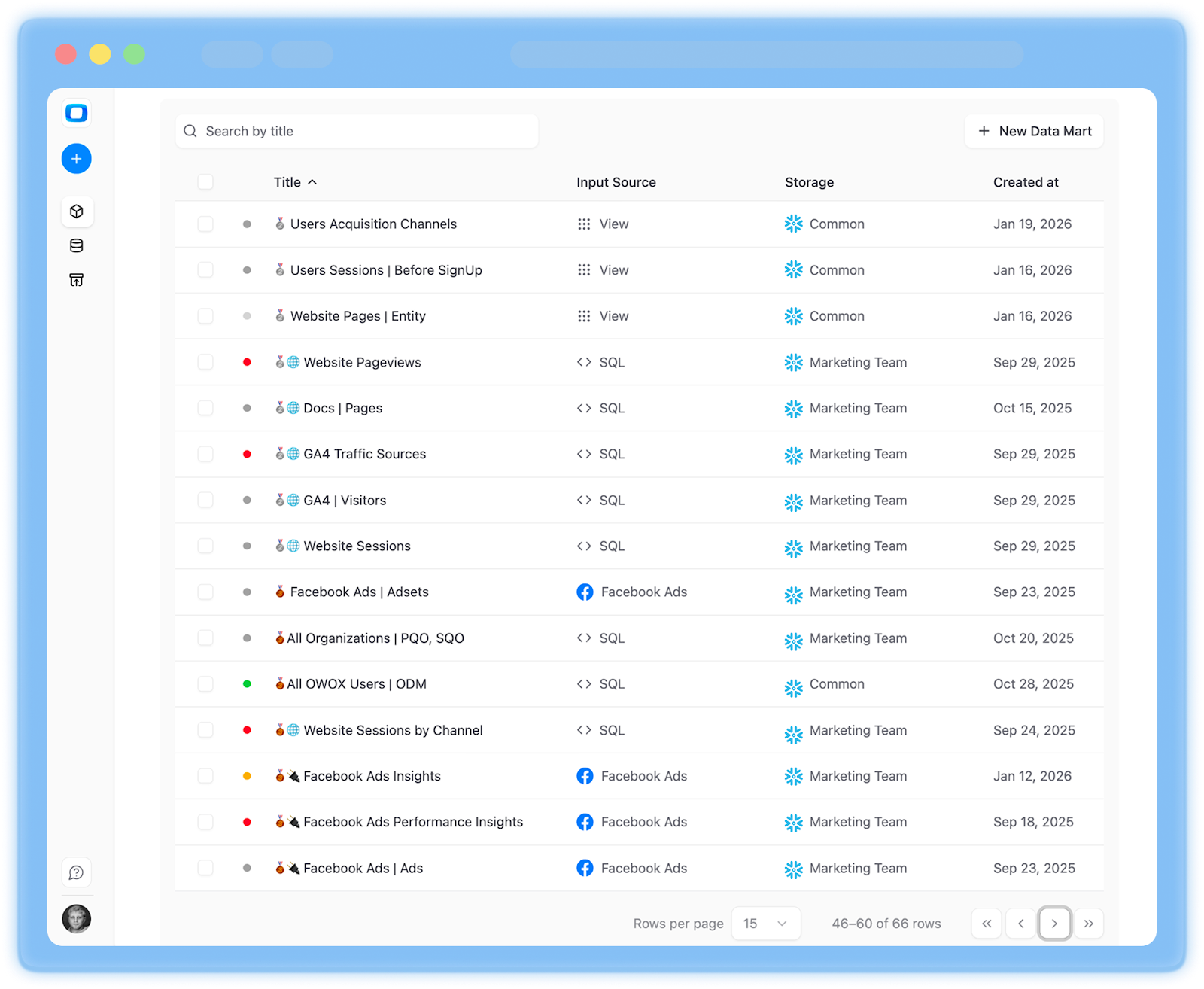
This is exactly the gap that OWOX Data Marts for Snowflake is designed to fill. It acts as the modeling and delivery layer on top of your Snowflake data, so marketing teams consume curated, governed datasets – not raw logs.
If you already have Snowflake and want to accelerate this layer instead of building it from scratch, you can explore OWOX Data Marts.
What You’ll Learn in This Guide
Over the rest of this article, we’ll translate this vision into concrete steps you can execute. You’ll learn how to:
1) Audit your current Snowflake setup for marketing readiness
- Identify what data already exists and what’s missing
- Map marketing use cases to specific tables and schemas
- Detect schema and metric inconsistencies that block trust
2) Design a marketing data model in Snowflake
- Define core entities and relationships tailored to your channels and sales motion
- Decide which logic belongs in ELT vs. the data mart layer
- Implement attribution, funnel, and cohort logic in reusable ways
3) Build governed, reusable data marts for marketing teams
- Create user-facing tables that hide technical complexity
- Standardize metric definitions and document them
- Configure access controls and row-level security for different roles
4) Deliver self-service access in the tools marketers use daily
- Connect curated Snowflake data marts to BI tools, spreadsheets, and notebooks
- Enable exploration without exposing raw schemas
- Keep performance and cost under control as usage scales
5) Run a 30-day rollout plan with clear milestones
- Week-by-week activities for data and marketing teams
- Concrete deliverables: first data mart, first executive dashboard, first self-serve analyses
- Governance rituals to keep metrics aligned as your stack evolves
Throughout, we’ll weave in how OWOX Data Marts can accelerate each phase if you choose not to build every component in-house – while keeping Snowflake as your single source of truth and execution environment.
By the end, you’ll have a practical roadmap to turn your existing Snowflake deployment into a self-service marketing analytics engine your go-to-market organization can rely on – without losing control over data quality, costs, or governance.
Why Snowflake Alone Is Not Yet Marketing Analytics

Typical Marketing Setups with Snowflake and Their Limitations
In most companies, Snowflake ends up as the technical backend for marketing reporting, not the analytics engine itself. The setup usually looks like this:
- Raw connectors feeding Snowflake
Ad platforms, web analytics, CRM, and product data land in separate schemas or raw tables with minimal transformation. - Analyst-built models and views
Data teams create a few shared views for spend, traffic, and conversions. Logic is often tailored to one department or one core dashboard. - BI layer on top
Tools like Looker Studio or Google Sheets connect directly to these data marts. Marketers consume dashboards and reports in spreadsheets when they need something custom. - Ad-hoc SQL for deeper questions
Analysts write custom queries to your Snowflake data for one-off questions like “true CAC by cohort, including CRM costs” or “incremental lift from a new channel.”
This approach works for static, high-level reporting, but cracks appear as soon as you need agile, self-service analytics. Common issues include:
- Dashboards tightly coupled to fragile SQL views
- Separate “special” models for each team or stakeholder
- Slow turnaround on new use cases because each one requires new modeling work
- Marketers are still dependent on analysts for anything beyond canned reports
Key Pain Points for Marketing Leaders and Analysts

For marketing leaders, the promise of “Snowflake + BI” often doesn’t translate into trustworthy, actionable insight. Typical pain points include:
- Inconsistent KPIs across teams and tools
Different ROAS, CAC, or LTV numbers between dashboards, Sheets, and platform UIs. - Fragile, high-maintenance dashboards
A small schema change in Snowflake breaks multiple reports. Adding a new channel or campaign type requires rework. - Limited trust in cross-channel views
Discrepancies between CRM, web analytics, and ad platforms undermine confidence. Attribution logic feels opaque. - Analyst bottlenecks and burnout
Analysts spend most of their time debugging joins, not generating insight. Backlogs delay decisions and experimentation. - Shadow analytics outside governance
Marketers export data into spreadsheets or internal tools. Custom calculations live in personal files, invisible to QA.
These issues aren’t caused by Snowflake itself. They arise because the marketing data environment is still operating at the raw-table level, without a dedicated semantic and governance layer.
What’s Missing: From Raw Tables to Trusted Marketing Reports
Snowflake delivers scalable storage, compute, and sharing – but not a ready-made marketing analytics environment. The gap is everything between “data is loaded” and “leaders trust and reuse the same metrics.”
What’s missing is:
- A unified marketing data model that aligns entities (campaigns, customers, journeys, orders) across all sources
- Centralized metric definitions (ROAS, CAC, LTV, attribution, funnel stages) implemented once and reused everywhere
- Curated, business-facing data marts instead of direct access to raw or lightly-modeled tables
- Governance and documentation that make metric logic transparent and auditable
This is the role of a marketing data mart layer on top of Snowflake. You can build this in-house, or accelerate it using a purpose-built solution like OWOX Data Marts for Snowflake, which turns your raw warehouse into a governed source of truth for marketing teams without asking everyone to write SQL.
The Role of a Marketing Data Mart on Top of Snowflake
A marketing data mart on top of Snowflake acts as the bridge between raw data and meaningful marketing insight. While Snowflake stores and processes data at scale, it does not reflect marketing concepts out of the box.
The data mart applies consistent business logic, standardizes metrics, and structures data around channels, campaigns, customers, and revenue. This allows teams to analyze performance, measure efficiency, and make decisions with confidence, without repeatedly rebuilding definitions or navigating complex source tables.
What a Marketing Data Mart Is and Why It Matters
A marketing data mart is a curated, business-ready layer of data built on top of Snowflake that’s designed specifically for marketing needs. Instead of exposing raw tables or technical schemas, it organizes data around how marketers actually think and work: channels, campaigns, audiences, journeys, and revenue.
Unlike raw data or a BI dashboard:
- It’s a data product, not just a report. Dashboards read from the mart, but the mart itself is the governed source of truth.
- It encodes business logic once. Definitions for ROAS, CAC, LTV, and attribution live in the mart, not duplicated in every report.
- It’s reusable across tools & stakeholders
For marketing teams, a data mart turns Snowflake from “somewhere the data lives” into a reliable foundation for planning, optimization, and performance measurement – without needing to understand how raw data is stitched together.

Core Entities and Metrics a Snowflake Marketing Data Mart Should Include
A useful marketing data mart on Snowflake should standardize a common set of entities and metrics that cover acquisition, engagement, and revenue.
Core entities:
- Channels (paid search, paid social, display, email, affiliates, organic, direct, offline)
- Campaign and ad structures (campaigns, ad groups/sets, creatives, keywords, audiences)
- Customer and account entities (users, leads, accounts, contacts, subscriptions, segments)
- Events and touchpoints (impressions, clicks, sessions, pageviews, email events, app events)
- Conversions and revenue (transactions, orders, signups, trial starts, MQLs/SQLs, pipeline, closed-won deals)
Key metrics:
- Spend and efficiency (spend, CPC, CPM, CTR, CPL, CPA)
- Revenue and profitability (revenue, margin, gross profit, ARPU, payback period)
- Unit economics (CAC, LTV, LTV/CAC ratio)
- Attribution views (first-touch, last-touch, position-based, data-driven)
- Funnel and retention (conversion rates by stage, activation, churn, retention cohorts)
In a well-designed Snowflake marketing data mart, these entities and metrics are:
- Consistently defined across all sources and tools
- Linked via stable keys (user IDs, account IDs, campaign IDs)
- Documented and discoverable, so teams understand what they’re using
How OWOX Data Marts Bridges Data and Marketing Teams
Building and maintaining this kind of marketing data mart in-house on Snowflake can take months and requires close collaboration between data and marketing teams. OWOX Data Marts for Snowflake accelerates this by providing a ready-made modeling and delivery layer tailored to marketing use cases.
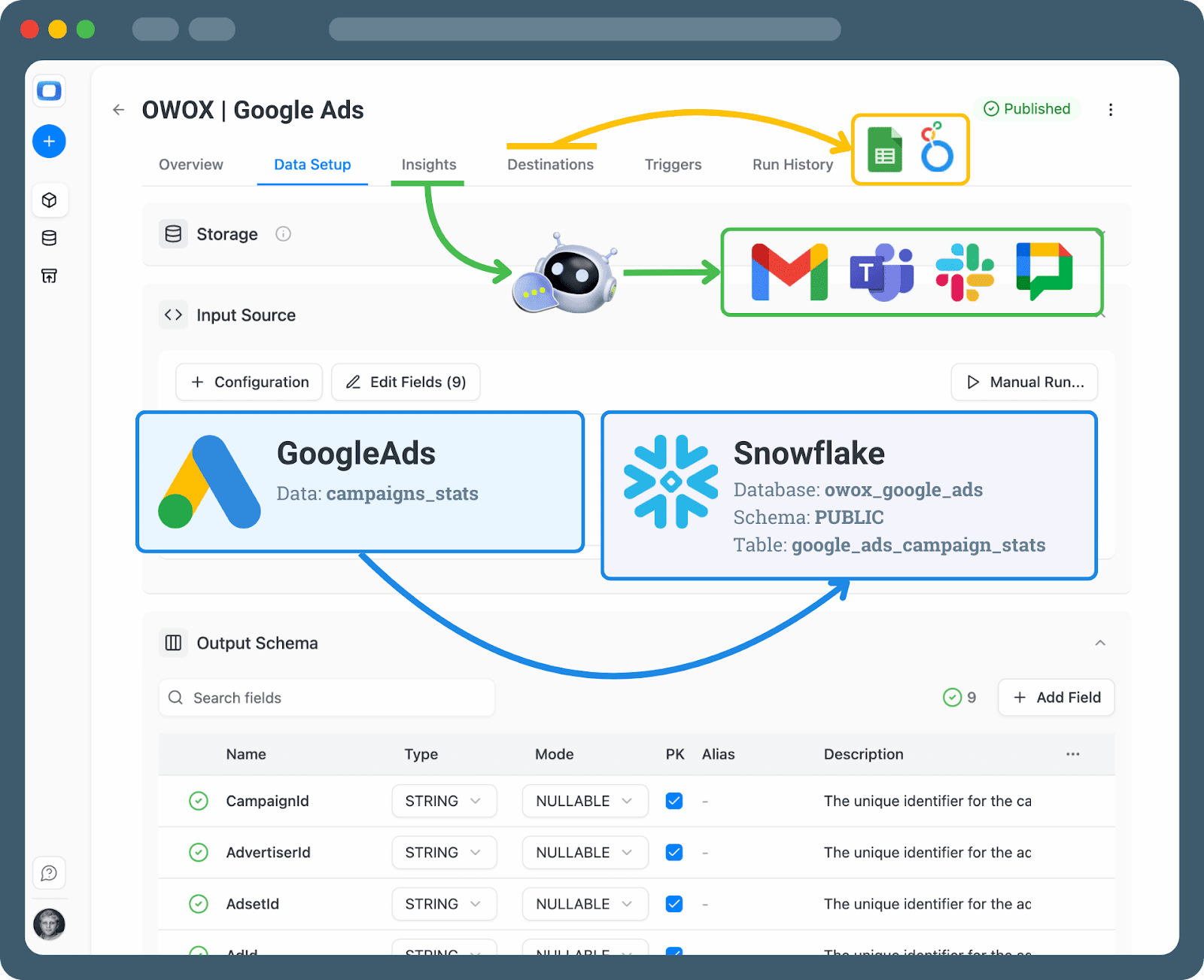
OWOX Data Marts:
- Standardizes metrics out of the box
Provides best-practice definitions for CAC, ROAS, LTV, and attribution so every dashboard starts from consistent logic. - Creates a shared language
Translates raw Snowflake schemas into marketing-friendly entities that both marketers and analysts can understand. - Governs data usage at the mart level
Controls access and metric calculation so self-service stays within consistent boundaries. - Keeps Snowflake as the source of truth
All transformations and marts run directly in your Snowflake environment, preserving security, lineage, and performance.
If you already have Snowflake and want to add this marketing-ready layer without reinventing the wheel, you can try OWOX Data Marts.
Connecting Your Marketing Platforms to Snowflake with OWOX
Connecting your marketing platforms to Snowflake with OWOX simplifies what is often the most complex part of a marketing analytics stack. Instead of building and maintaining custom ETL pipelines, teams can rely on managed, marketing-specific connectors that reliably ingest data from multiple ad platforms into Snowflake, with consistent schemas and minimal engineering overhead.
Ingesting Data from Meta, Google Ads, TikTok, LinkedIn, and More
To turn Snowflake into a marketing analytics engine, you first need a robust way to bring in data from your key channels. With OWOX, this happens through managed, marketing-focused connectors that land data directly into your Snowflake account.
At a high level, the process looks like this:
- Authorize each marketing platform
In the OWOX UI, connect Google Ads, Meta Ads, TikTok Ads, LinkedIn Ads, X Ads, Microsoft Ads (formerly Bing Ads), Pinterest Ads, and more. - Configure what and how often to load
Choose reporting levels (campaign, ad group, creative, keyword, audience, placement, etc.). Set daily or intra-day sync schedules based on how real-time reporting needs to be. Configure historical backfill to cover previous months or years. - Map to your Snowflake environment
Select the Snowflake warehouse, database, and schema where raw and staged tables will live. OWOX creates and maintains table structures optimized for marketing analytics, not just raw API dumps. - Monitor and manage from a single place
Track load status, API errors, and schema changes across all platforms. Adjust schedules and settings without writing code or touching ETL pipelines.
Because OWOX is built specifically for marketing data, it handles the APIs, limits, and reporting quirks of each platform so you don’t have to. Your team gets clean, structured data in Snowflake with minimal engineering involvement.

Handling Marketing-Specific Nuances: Currencies, Time Zones, UTM Parameters
Marketing data isn’t just about pulling numbers. It’s about making sure they’re comparable across channels and regions. OWOX handles many painful edge cases during ingestion and normalization, including:
- Multiple currencies
Normalize spend and revenue to a base currency using consistent exchange rates. Preserve original currency fields for reconciliation. - Time zones and day boundaries
Align reporting dates across platforms in different time zones. Support both platform-local time and business-defined time zones. - UTM parameters and tracking IDs
Parse and standardize UTM tags (source, medium, campaign, content, term). Map platform objects to UTM-based groupings for deeper analysis. - Platform-specific dimensions
Harmonize naming and structures (for example, “ad set” vs. “ad group”). Handle missing or legacy fields gracefully for long-term trend analysis.
By addressing these nuances upstream, your Snowflake marketing data mart can operate on standardized tables instead of patching inconsistencies at query time.
Keeping Marketing Data Fresh and Reliable Without Engineering Bottlenecks
For marketing teams, stale or unreliable data is almost as bad as no data. OWOX is designed to keep your Snowflake environment up to date without constant engineering support.
Key practices and capabilities include:
- Automated, scheduled loads
Configure daily, hourly, or custom refresh schedules per source. Automatically re-pull recent days to capture late-arriving conversions. - Health checks and alerting
Monitor pipeline status, API quotas, and error rates from a central dashboard. Receive alerts when loads fail or schemas change. - Stable schemas for downstream users
Shield Snowflake tables from breaking changes in external APIs. Introduce new fields in a controlled way, so dashboards don’t break. - Reduced analyst dependency
Marketers rely on consistently updated datasets. Analysts focus on modeling and insights instead of babysitting pipelines.
If you want to connect your marketing stack to Snowflake with these capabilities out of the box, you can start with OWOX Data Marts.
Modeling Trusted Marketing Metrics in OWOX Data Marts
Modeling trusted marketing metrics in OWOX Data Marts ensures that performance analysis is consistent, auditable, and scalable. By defining core KPIs such as ROAS, CAC, and LTV directly in Snowflake using SQL, teams eliminate metric drift, reduce duplication, and create a single, governed foundation for all reporting and analysis.
Defining Reusable Metrics (ROAS, CAC, LTV) Once with SQL
The biggest step toward trustworthy marketing analytics is defining your core metrics once and reusing them everywhere. In OWOX Data Marts on Snowflake, that means encoding metric logic in SQL views or models that become the canonical source for downstream reporting.
Typical examples include:
- ROAS (Return on Ad Spend)
ROAS = revenue / ad_spend
Defined at different grains (campaign, ad group, creative), but always using the same underlying revenue and spend fields from your curated mart. - CAC (Customer Acquisition Cost)
CAC = total_marketing_cost / new_customers
The total marketing cost may include brand + performance spend, and new customers are derived from your unified customer table. - LTV (Customer Lifetime Value)
LTV = sum(net_revenue_per_customer_over_period)
Often modeled via cohort tables that aggregate revenue, margin, and churn over time.
Modeling tips for Snowflake + OWOX:
- Implement metrics in centralized SQL-based data marts referenced by all tools, not inside individual dashboards
- Keep calculation logic in the data marts, not in ad-hoc queries connected to BI tools or spreadsheets
- Use query parameterization (lookback windows, attribution models) to support multiple views while sharing base logic
- Document metrics directly in the mart, so users understand exactly what they’re using
OWOX Data Marts provides ready-made templates and structures, so you start from proven definitions and adapt them to your business. Explore a Snowflake-ready setup at OWOX Data Marts.

Unifying Channels and Campaigns Into Consistent Dimensions
Cross-channel analytics only works when all platforms share the same dimensional language. In OWOX Data Marts, this is handled by building shared, normalized dimensions on top of Snowflake.
Common examples:
- Channel and subchannel
Channel: Paid Search, Paid Social, Display, Email, Affiliate, Organic, Direct, Offline
Subchannel: Google Ads, Meta Ads, TikTok Ads, LinkedIn Ads, etc. - Campaign taxonomy
Standardized fields like campaign_objective, funnel_stage, geo, and product_line – based on naming conventions or UTM parsing. Mapping tables align legacy naming patterns. - Audience and segment dimensions
audience_type: remarketing, prospecting, CRM-based
segment: high-value customers, churn-risk, new users - Business dimensions
region, market, business_unit, sales_team, pricing_plan
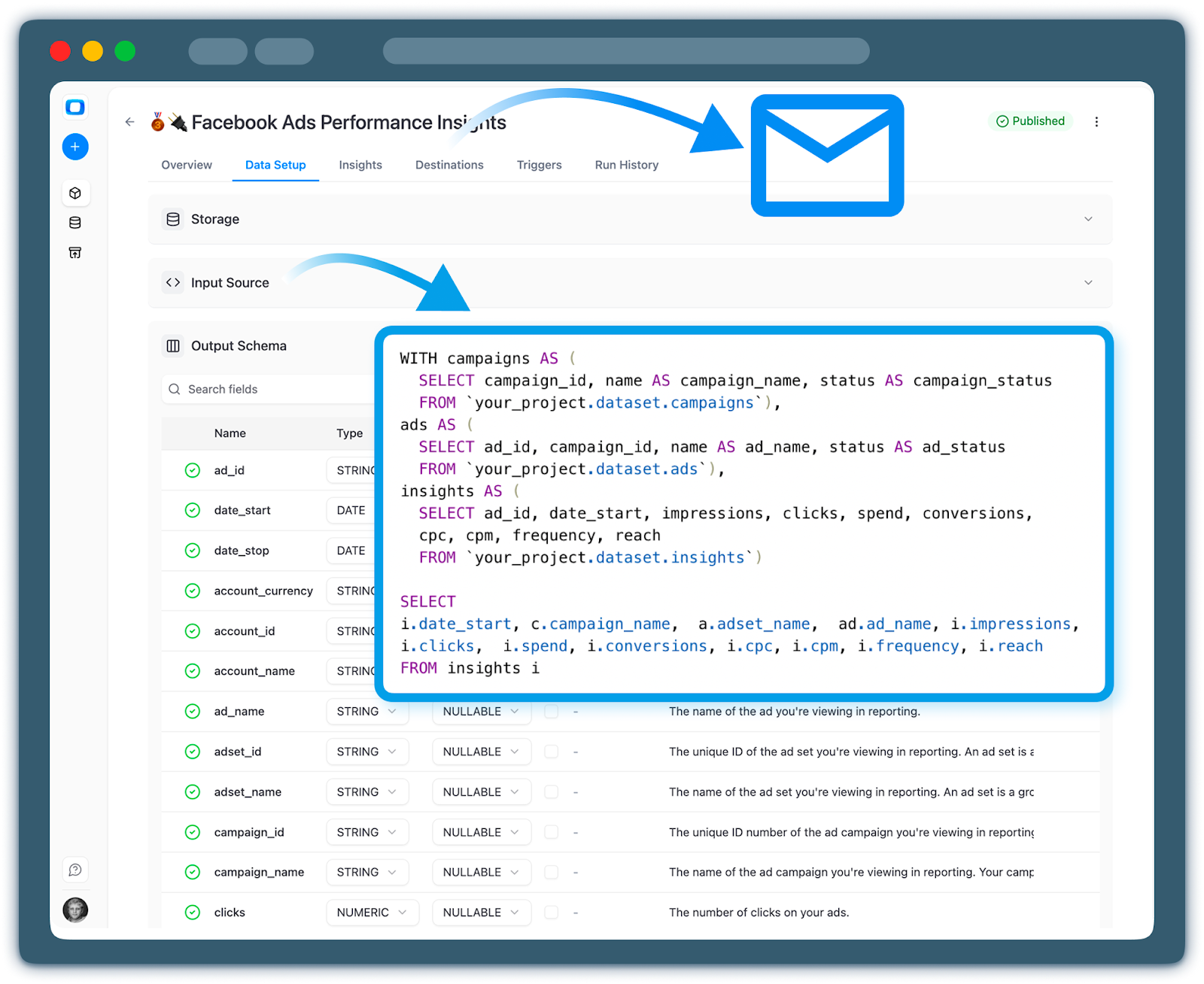
OWOX uses transformation rules and mapping tables in Snowflake to:
- Normalize naming across platforms (for example, “ad set” vs. “ad group”)
- Enrich raw data with business tags for cleaner filtering
- Ensure the same campaign appears with consistent attributes in every report
Governing Changes to Metrics Logic as Marketing Evolves
As your marketing strategy evolves, metric definitions evolve too. Without governance, this creates silent metric drift and broken trust. OWOX Data Marts encourages a disciplined approach to managing logic on Snowflake.
Key practices:
- Version control for SQL models
Store transformation and metric SQL in a git repository. Tag releases to trace which logic was active at any point in time. - Change approval workflows
Treat metric changes like code changes. Require review from both a data owner and a marketing owner before merging. - Automated testing and validation
Run regression checks when logic changes. Validate row counts, key distributions, and sample outputs. - Transparent communication and documentation
Maintain a metrics catalog with definitions, owners, and change history. Announce significant logic changes with clear impact notes.
With OWOX Data Marts acting as the governed metrics layer on Snowflake, you get flexibility without losing your single, auditable source of truth – so everyone can see what changed, when, and why.
Delivering Self-Service Marketing Insights from Snowflake
Delivering self-service marketing insights from Snowflake means moving beyond centralized reporting to true data accessibility. By exposing governed marketing data marts directly to BI tools and spreadsheets, teams can explore, analyze, and performance report independently - without relying on engineers or recreating business logic in every tool.
Exposing Governed Data Marts to BI Tools and Spreadsheets
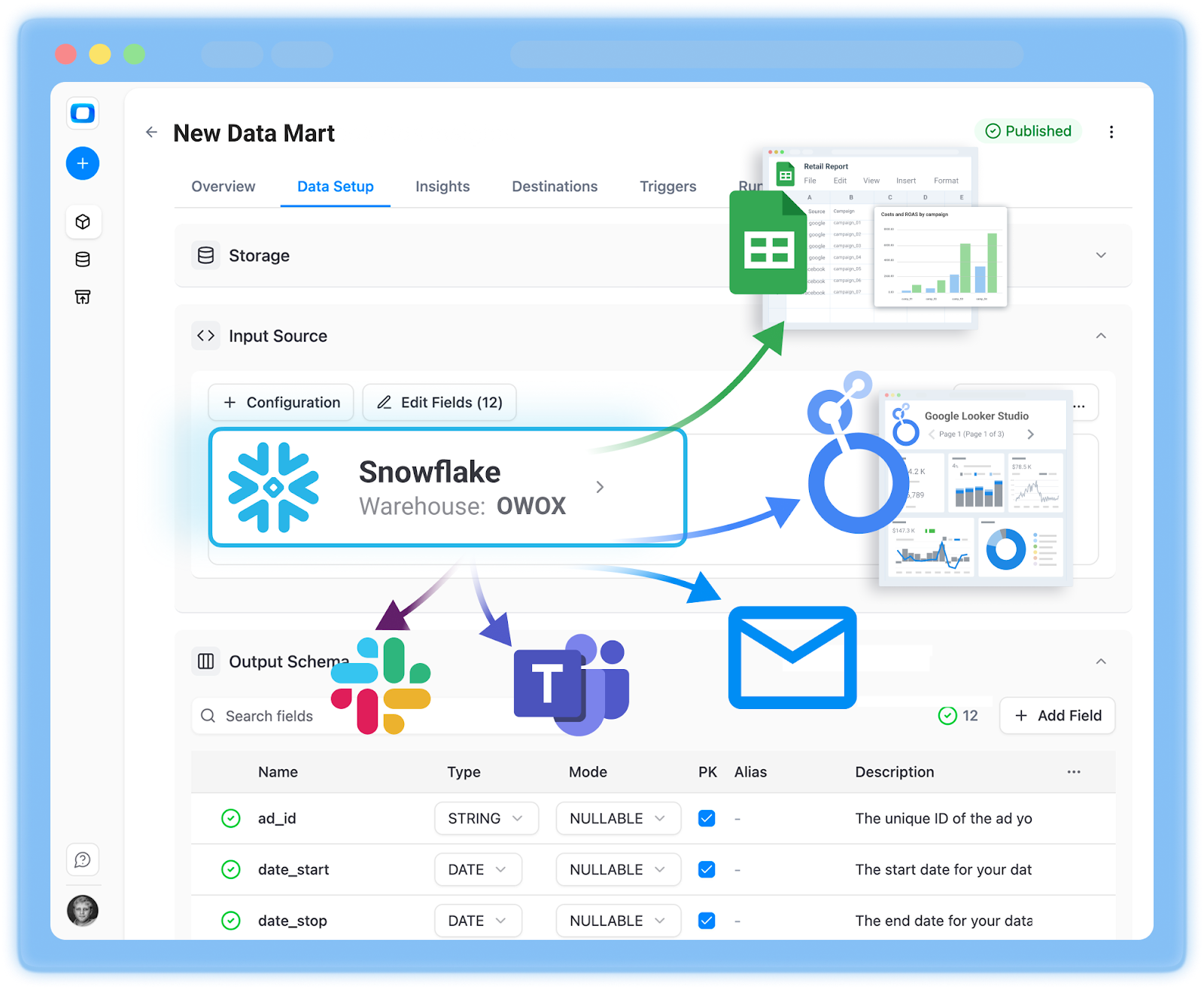
Once your marketing data mart is live in Snowflake, the next step is to make it accessible in the tools marketers already use. OWOX exposes curated data marts so BI tools and spreadsheets can connect and gives you full control over output schemas, field aliases, and descriptions – basically meta-data of your Gold-Layer Reporting.
Typical integrations include:
- Google Sheets
Pull curated campaign, channel, and revenue tables into Sheets. Refresh on a schedule, so weekly reports and trackers always use current Snowflake data. - Looker Studio
Build executive dashboards on a single trusted Snowflake connection. Use pre-modeled dimensions and metrics from OWOX Data Marts instead of rebuilding logic inside each dashboard.
Enabling Marketers to Get Answers without Writing SQL or Breaking Logic
Self-service doesn’t mean giving everyone SQL access. It means giving everyone reliable ways to answer questions without redefining metrics.
OWOX supports this through:
- Pre-built, governed datasets
Tables are built for specific use cases (for example, performance_by_campaign_daily). Joins and calculations are pre-defined. - Template dashboards and reports
Ready-to-use dashboards for acquisition performance, funnel analysis, and budgeting – connected directly to Snowflake data marts. Marketers can customize filters without touching the logic. - Role-based access and views
Teams see the same core metrics, with filters and breakdowns tailored to their needs. Sensitive fields can be restricted. - Guardrails by design
Because the heavy logic lives in OWOX Data Marts, marketers can’t accidentally redefine CAC or ROAS. New questions start from the same governed tables.
This combination of governed marts and user-friendly access lets teams move quickly without sacrificing trust. Explore this setup with OWOX Data Marts.
Real-World Examples of Performance, Funnel, and Budget Reports
When everything is built on a single Snowflake marketing data mart, reports become different views of the same truth, not separate analytics projects.
Examples you can power from one governed mart:
- Cross-channel performance dashboard
Daily view of spend, clicks, conversions, revenue, ROAS, and CAC by channel, campaign, and creative. - Full-funnel conversion report
Tracks visitor → lead → opportunity → customer across web analytics, CRM, and ad platforms. - Budget vs. actuals and forecast
Compares planned spend and targets vs. actuals in near real time, then projects end-of-month outcomes based on trend.
In each case, analysts define models once inside OWOX Data Marts on Snowflake. Marketers then slice, filter, and explore confidently, knowing every number comes from the same governed logic.
Using AI Insights on Snowflake Data to Inform Marketing Decisions
Using AI insights on Snowflake data enables marketers to ask complex questions in natural language while maintaining analytical rigor. When AI is connected to governed marketing data marts rather than raw or unverified sources, insights are grounded in validated metrics and consistent business logic. This ensures AI-driven analysis supports confident decision-making without compromising accuracy, trust, or data governance.
How AI Reads From Governed Data Marts Instead of Hallucinating Numbers
Many “AI analytics” approaches fail because the AI is allowed to guess or invent. When AI is layered on top of governed Snowflake data marts, it doesn’t invent numbers – it queries trusted tables.
In an OWOX + Snowflake setup:
- AI reads only from curated marts where metrics like ROAS, CAC, and LTV are defined and tested
- Metric logic lives in SQL models, not in the AI layer
- Governance enforces boundaries (role-based access, row-level security, metric definitions) before AI sees data
This architecture turns AI into a natural language interface on top of governed analytics – not a separate calculation engine.
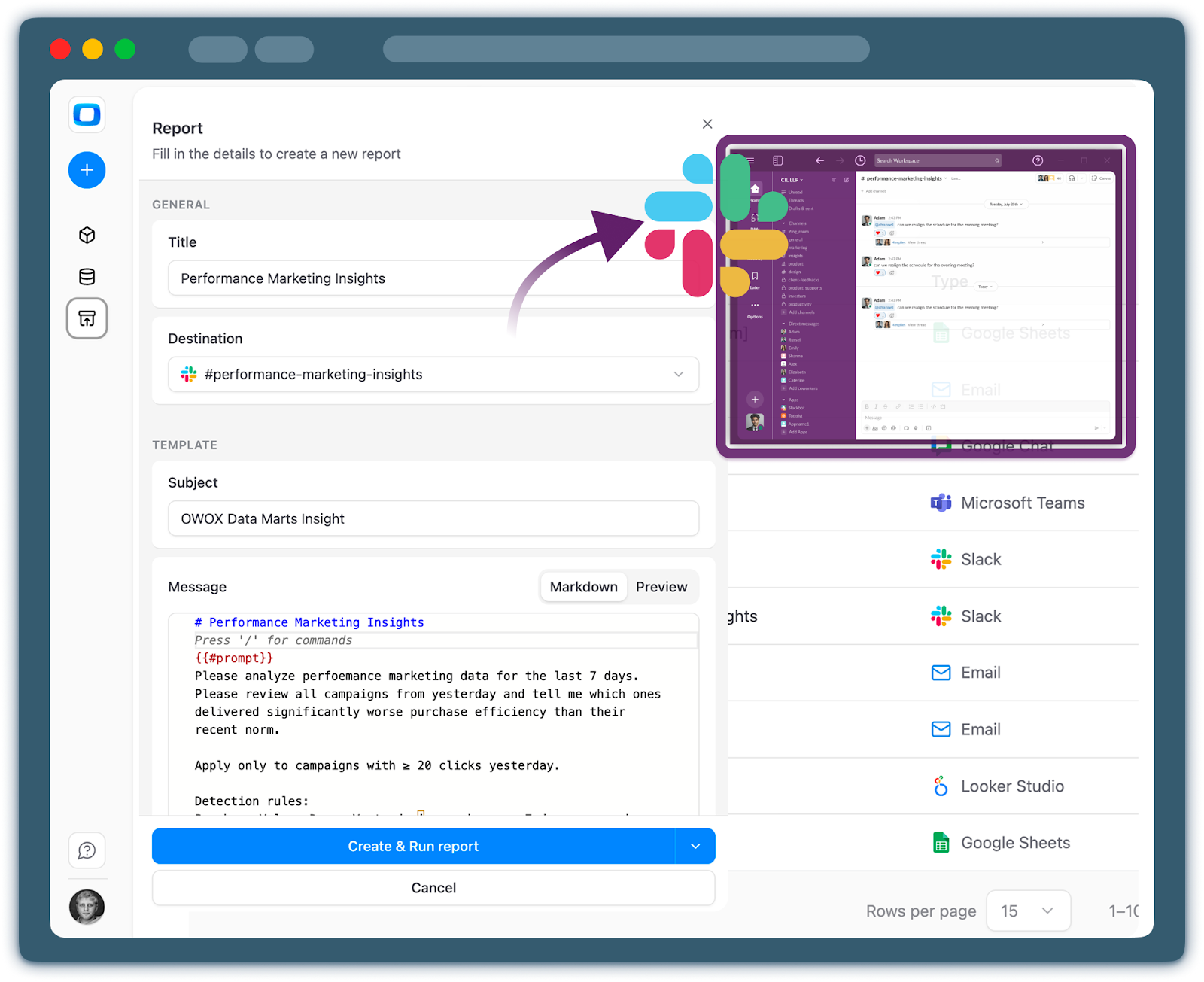
Setting Up Team-Specific Prompts and Alerts
Not every team needs the same insights or the same language. OWOX lets you configure prompts and alerts tailored to different audiences, all backed by Snowflake data marts.
Examples:
- Marketing prompts
“Summarize the top 5 campaigns by incremental revenue this week.”
“Alert me if CAC increases by more than 20% for any paid social campaign.” - Product prompts
“Highlight segments with declining activation rates after the latest release.”
“Notify me when churn spikes for a specific plan or region.” - Finance and leadership prompts
“Send a weekly summary of LTV/CAC by channel and variances vs. plan.”
“Alert if total marketing spend deviates from budget by more than 10%.”
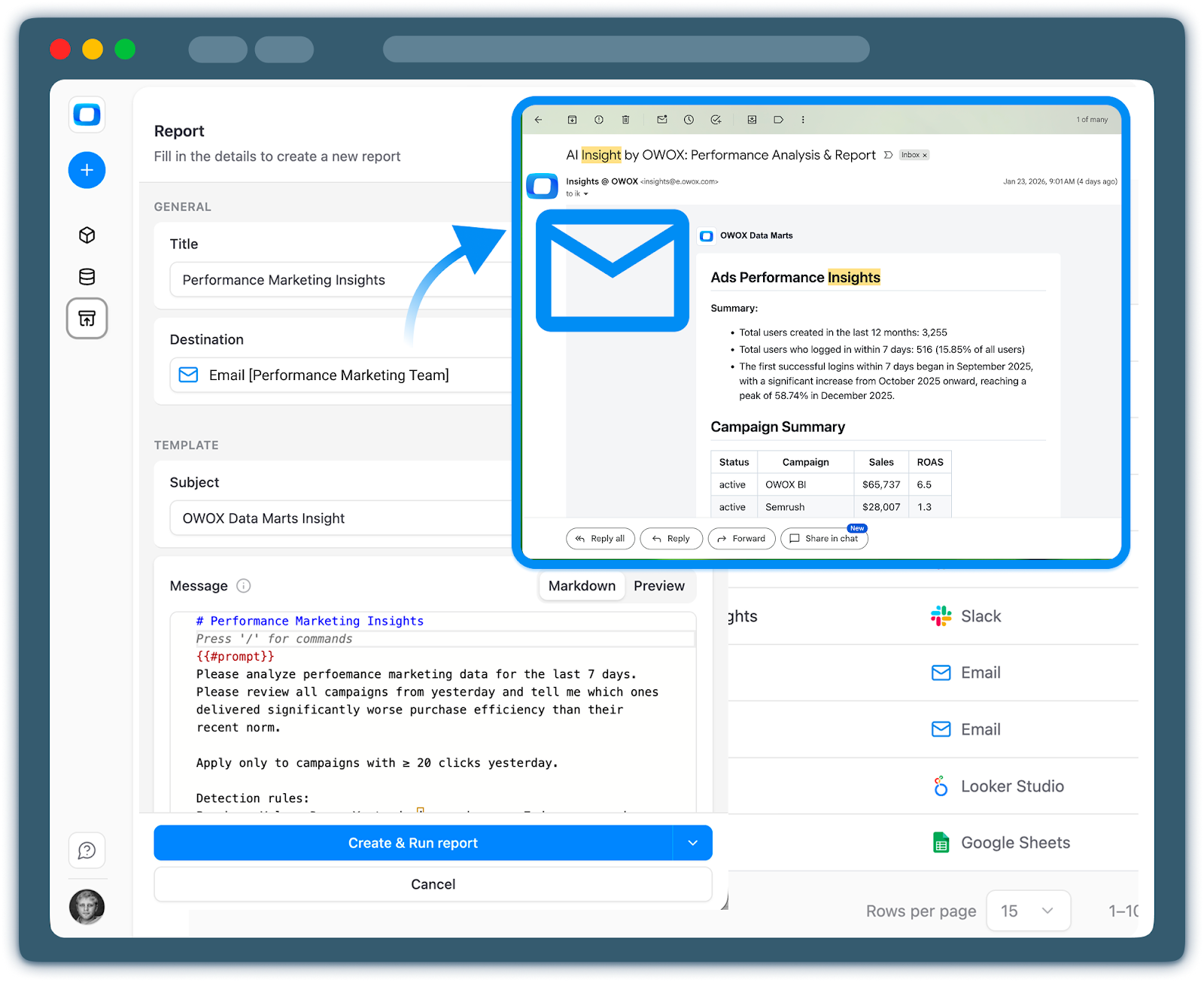
Alerts can be delivered through Slack or Microsoft Teams, email digests, or embedded dashboard notifications.
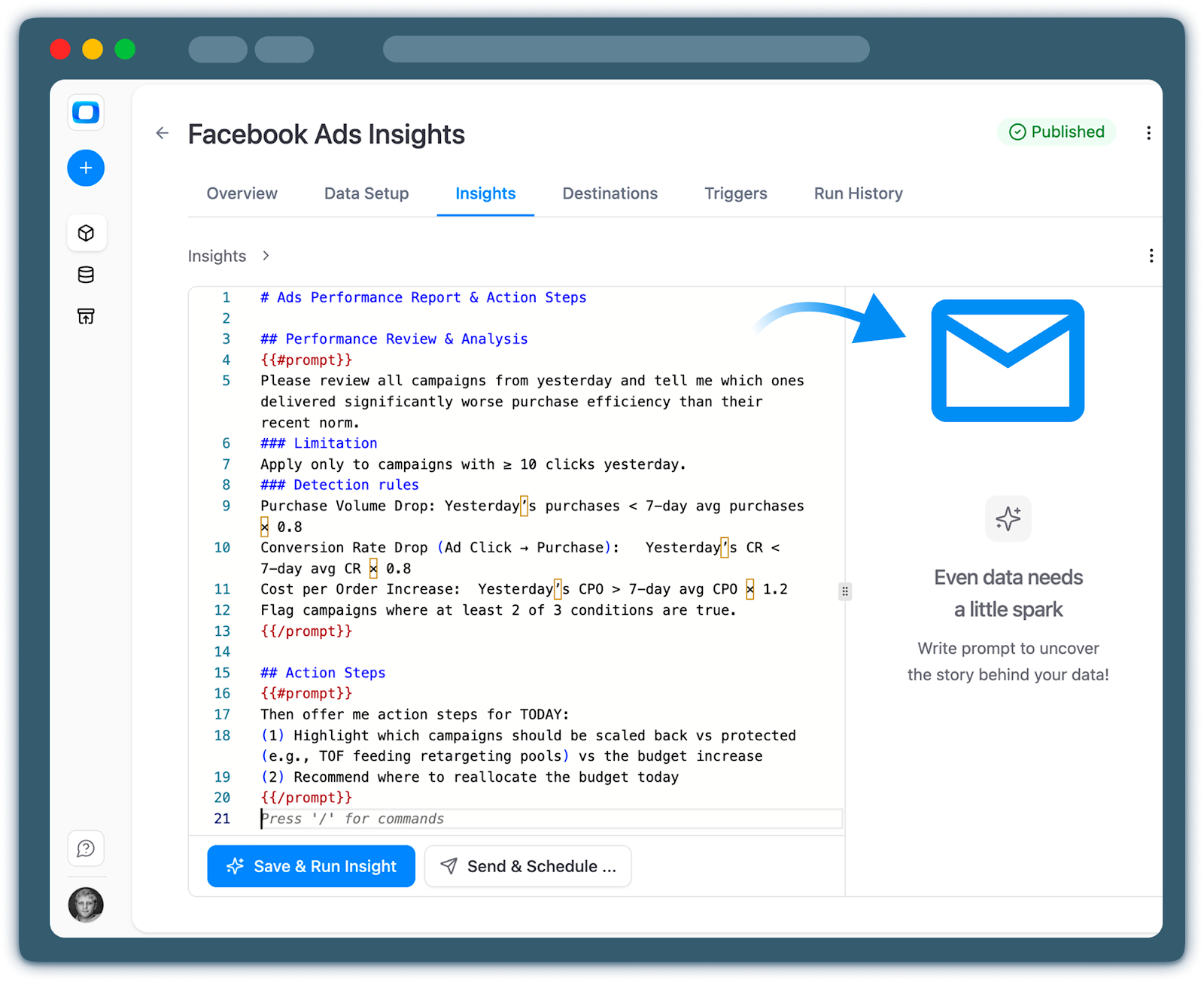
Delivering the Right Insight to the Right Person at the Right Time
AI becomes most valuable when it proactively surfaces insights in the right workflow. With OWOX on Snowflake, you can orchestrate workflows that monitor governed data and push insights where they’re most actionable.
Typical workflows:
- Performance anomaly detection
AI monitors daily performance tables for drops in conversions, spikes in CPC, or shifts in funnel conversion, then posts a concise summary in a team channel. - Funnel health checks
Weekly scans of funnel tables for significant shifts in activation or retention, then email a summary with links to pre-filtered dashboards. - Budget burn and forecast alerts
AI compares the current pace to the budget tables in Snowflake and alerts channel owners when spend is trending off-plan.
In all cases:
- Data comes from governed data marts
- Logic is encoded in SQL and alert rules
- AI turns technical findings into clear, human-readable narratives
To experiment with AI-driven insights while keeping control over metrics and governance, start using OWOX Data Marts.
Getting Started in 30 Days with Snowflake and OWOX Data Marts
Getting started with Snowflake and OWOX Data Marts does not require a long, complex implementation. By following a structured, phased approach, teams can move from initial access and data ingestion to a governed marketing data mart and live dashboards within 30 days, while aligning stakeholders and delivering early, measurable value.
Phased Rollout Plan: From First Connections to Your First Data Mart
You don’t need a six-month project to start getting value. With focused effort, most teams can reach a working, governed marketing analytics stack in about 30 days.
Week 1: Foundation and access
- Confirm Snowflake access and ownership (warehouse, database, schema)
- Identify stakeholders from marketing, analytics, and data engineering
- Define 2–3 priority use cases (for example, cross-channel ROAS, CAC by channel, budget vs. actuals)
- Sign up for OWOX Data Marts and connect it to Snowflake.
Week 2: Connect sources and land raw data
- Connect core ad platforms in OWOX (Google Ads, Meta Ads, TikTok, LinkedIn, etc.)
- Configure sync schedules and historical backfill (last 6–12 months)
- Land raw and staged tables into Snowflake with OWOX-managed API-native schemas
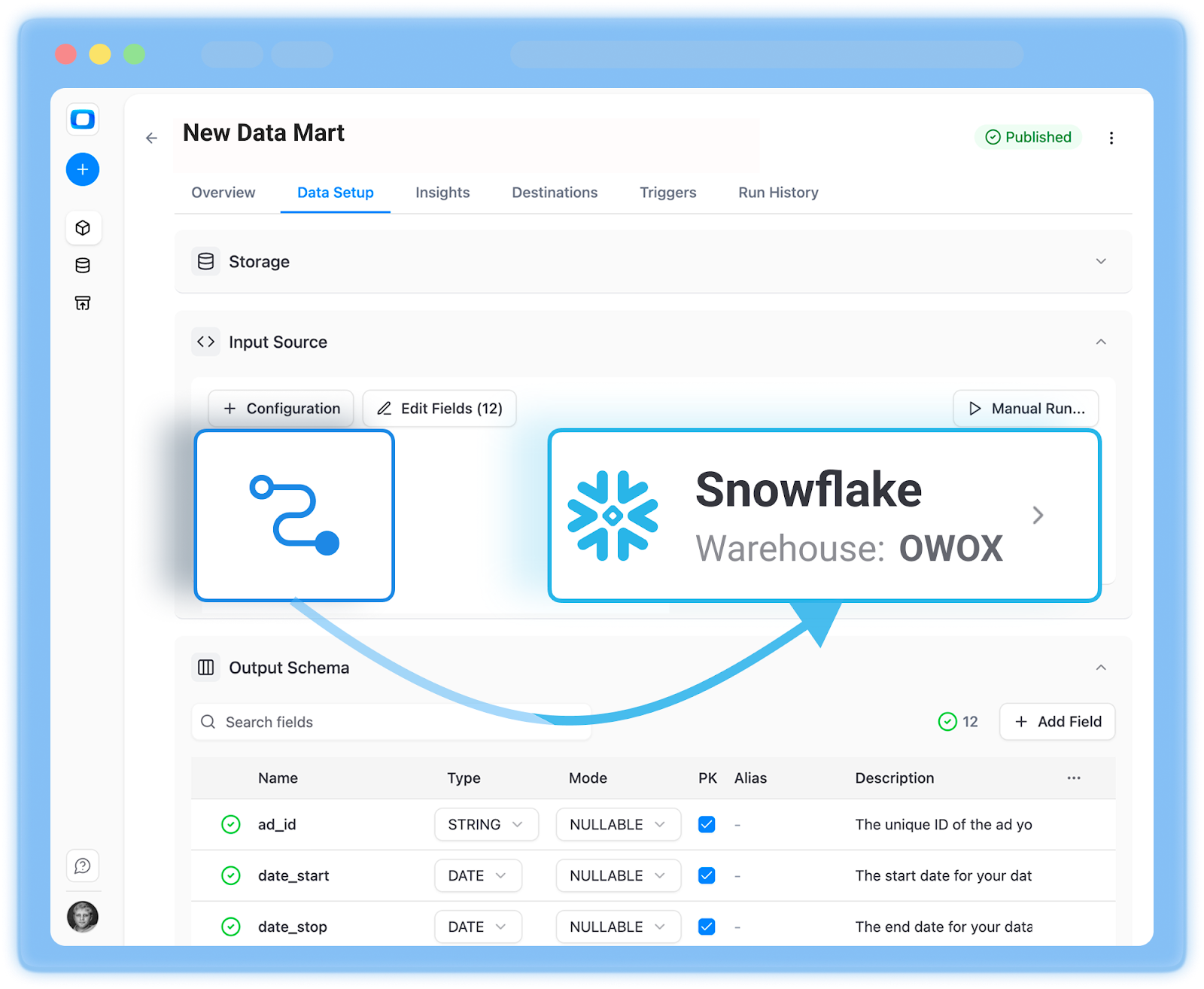
Week 3: Build your first marketing data mart
- Enable OWOX templates for acquisition and performance
- Customize entities (channels, regions, product lines) to your taxonomy
- Implement standardized metrics (ROAS, CAC, basic attribution) via OWOX models in Snowflake
- Expose a first curated mart (for example, marketing_performance_daily)
Week 4: Enable self-service and iterate
- Connect Looker Studio, Sheets, or your BI tool to the Snowflake mart
- Launch 2–3 key dashboards (executive performance, channel deep-dives, budget tracker)
- Train stakeholders to use governed datasets, not raw tables
- Collect feedback and prioritize next marts (funnel, LTV, retention)
By Day 30, you should have campaigns flowing into Snowflake, a working marketing data mart via OWOX, and your first self-service dashboards live.
Quick Wins Marketing Teams Can Expect in the First Month
Even in the initial rollout, marketing teams typically see tangible improvements:
- Faster answers to recurring questions
- Fewer ad-hoc analyst requests
- More consistent numbers across teams
- Clearer visibility into budget and performance
These quick wins build trust and momentum, making it easier to expand into more advanced marts in the following months.
How to Try OWOX Data Marts with Snowflake (It’s Free)
If you already have Snowflake, you’re most of the way there. The missing piece is the marketing data mart and governance layer, which is exactly what OWOX provides.
You can get started in two ways:
Option 1: Get started free
- Go to https://www.owox.com/app-signup
- Connect your Snowflake as a Data Storage
- Create your first data marts & get value right away by connecting it into Google Sheet & Looker Studio
- Enable AI Insights delivered into Slack, MS Teams, Google Chat or Email on a schedule
Option 2: Guided demo with OWOX experts
- Book a session to review your Snowflake + marketing setup
- Walk through how OWOX maps to your use cases and stack
- Get a tailored 30-day rollout plan with recommended marts, dashboards, and governance practices
If your goal is to turn Snowflake from a raw data warehouse into a self-service marketing analytics engine – with trusted metrics, AI-ready insights, and minimal engineering overhead – starting a trial or booking a demo is the fastest next step.
Frequently asked questions




Finally, a tool that doesn't ask business users to learn a new dashboarding UI. Our marketing team already knows Sheets. OWOX just delivers the right data.
Joinable data marts concept was the thing that sold us. We can now use the semantic layer without building one.
Self-hosted the OSS version on Digital Ocean. Zero vendor lock-in. Contributed a Shopify connector back in week two.